21. Payment Gateway Setup
Customer payments, vendor subscription payments and wallet top-ups all run through the gateways you enable under Payment Methods in the admin panel. Credentials are stored in Firestore and read server-side by the panels, so secret keys are never bundled into the mobile apps. Each gateway has a sandbox/live toggle — test in sandbox before switching to live.
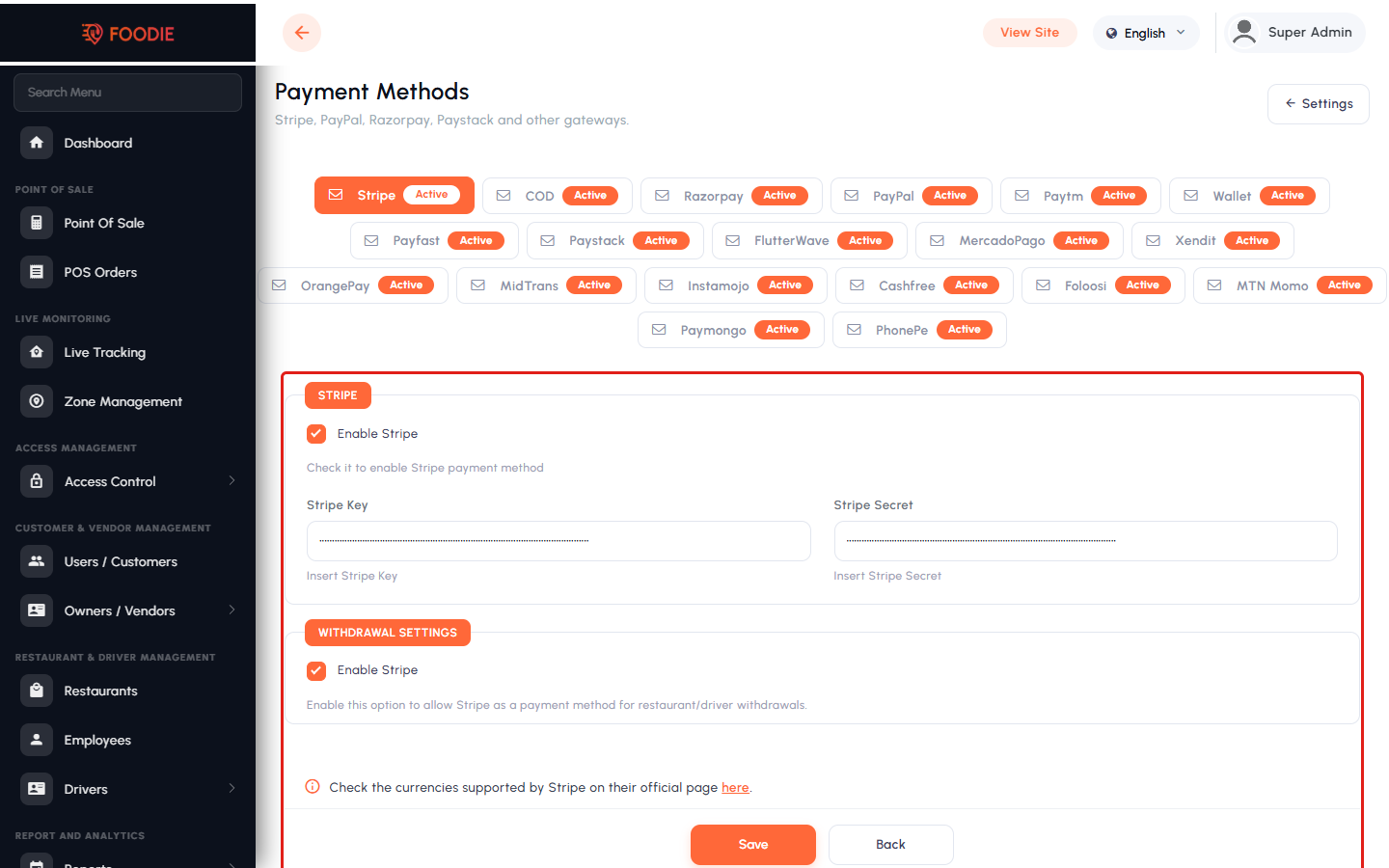
Foodie integrates 18 online payment gateways, plus Cash on Delivery and the in-app Wallet:
- Stripe, Apple Pay, PayPal, Razorpay, Paytm, PayFast, Paystack, Flutterwave, MercadoPago, Xendit, OrangePay, MidTrans, MTN MoMo, PhonePe, Cashfree, Instamojo, Foloosi and PayMongo.
21.1. How to enable a gateway
- Go to Payment Methods in the admin sidebar and open the gateway’s tab.
- Tick Enable.
- Paste the credentials from that provider’s dashboard.
- Choose sandbox or live mode.
- Click Save.
21.2. Credentials each gateway needs
- Stripe — Stripe Key (publishable) and Stripe Secret.
- Apple Pay — enable the toggle; it runs on top of the Stripe configuration on supported iOS devices.
- PayPal — PayPal App ID (Client ID), PayPal Secret and the Live Mode toggle.
- Razorpay — Razorpay Key and Razorpay Secret.
- Paytm — Merchant ID, Merchant Key and the environment (test/production).
- PayFast — Merchant ID, Merchant Key, plus Return, Cancel and Notify URLs.
- Paystack — Paystack Key and Paystack Secret.
- Flutterwave — Public Key and Secret Key.
- MercadoPago — MercadoPago Key and Access Token.
- Xendit — Xendit API Key.
- OrangePay — Client ID, Secret, Auth token, plus Return, Cancel and Notify URLs.
- MidTrans — Merchant ID and Server Key.
- MTN MoMo — Primary Key, Secondary Key, Target Environment, Callback URL and expiry time in seconds.
- PhonePe — Merchant Key, Client Key, Client Secret, Salt Key and Flow ID.
- Cashfree — Client Key and Secret Key.
- Instamojo — Instamojo Key and Secret Key.
- Foloosi — Foloosi Merchant Key.
- PayMongo — PayMongo Secret Key.
- Cash on Delivery (COD) — no credentials; just enable it.
- Wallet — no credentials; enable it to let customers pay from their in-app wallet balance. Top-ups still go through one of the gateways above.
Callback URLs. Gateways that redirect back to your site (PayFast, OrangePay, MTN MoMo and others) need their Return / Cancel / Notify URLs pointing at your live HTTPS domain, and the same URLs whitelisted in the provider’s own dashboard. Payments will appear to “hang” on the gateway page if these do not match.
21.3. Where the secret keys are used
Gateways that use a secret key perform their sensitive operations — creating and verifying transactions — server-side inside the Laravel panels. The browser and the mobile apps send only non-sensitive data (amount, currency, reference); the panel reads the gateway’s secret from the settings document the Admin Panel manages and talks to the provider itself, so no secret key is ever shipped in the apps or exposed to the browser.
This is also why the payment callback URLs must point at your live HTTPS domain: the provider redirects back into the panel, which then verifies the transaction before the order is marked paid.



