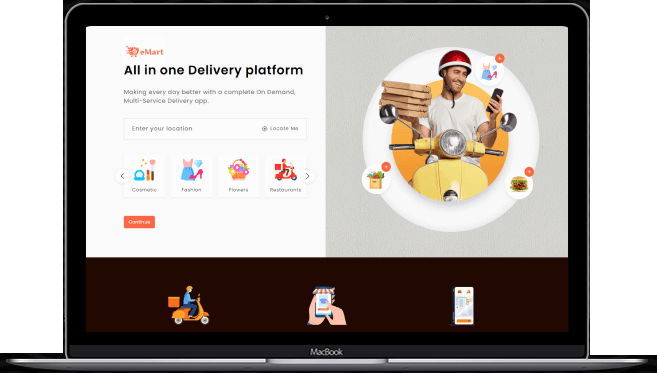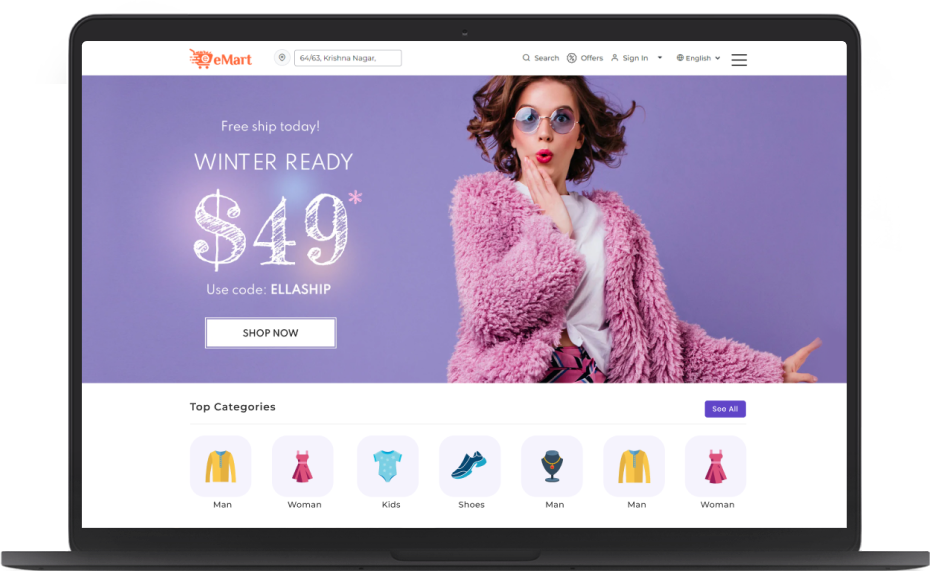
Empowering Endless Possibilities in One App

Welcome to our Integrated Multi-Vendor Marketplace, where convenience meets choice! Our platform brings together a diverse array of sellers, offering an extensive range of products and services all in one place. Whether you’re searching for fashion, electronics, home goods, or specialty items, we’ve got you covered.
  • + One-Stop Multi Services
  • + Curated Selection
  • + Smooth Transition
  • + Secure Transactions
  • + Personalized Experience
  • + 24×7 Customer Support

Core Features All Your App & Website Needs

Unlock the potential of your digital platform with our comprehensive suite of core features designed to elevate both your app and website. From seamless user experiences to robust functionality, our offerings ensure your platform stands out in today’s competitive landscape.

Most premium and exclusive features across the app

Elevate your interaction to a new level with cutting-edge functionalities designed to exceed your expectations.

Multi Business in One
Dashboard

A comprehensive platform designed to streamline and multiple business operations simultaneously.

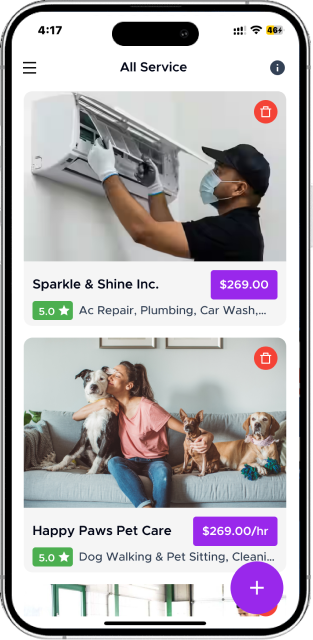
Multi Vendor Service App

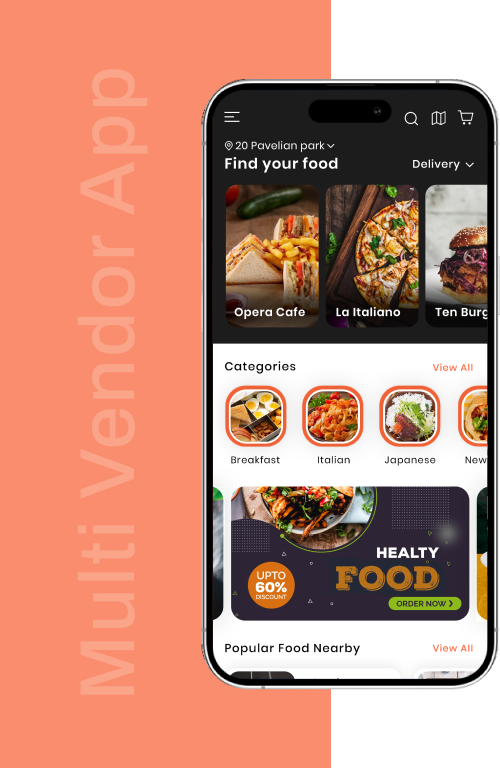
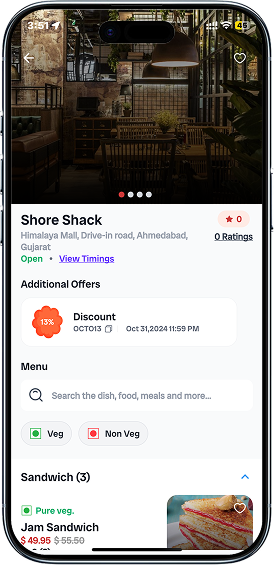
A Multi Vendor Service App is a digital platform designed to connect service providers with customers in need of various services. It serves as a marketplace where multiple vendors or service providers can register their offerings, enabling customers to browse, compare, and select services based on their preferences, location, and budget.

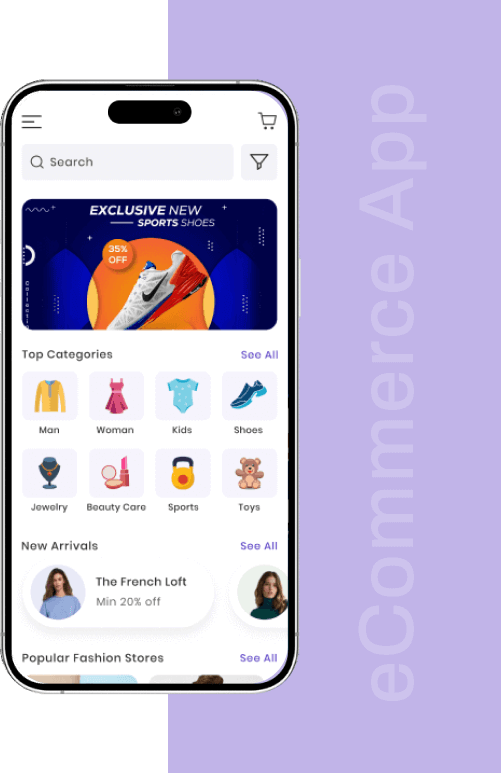
eCommerce Service App

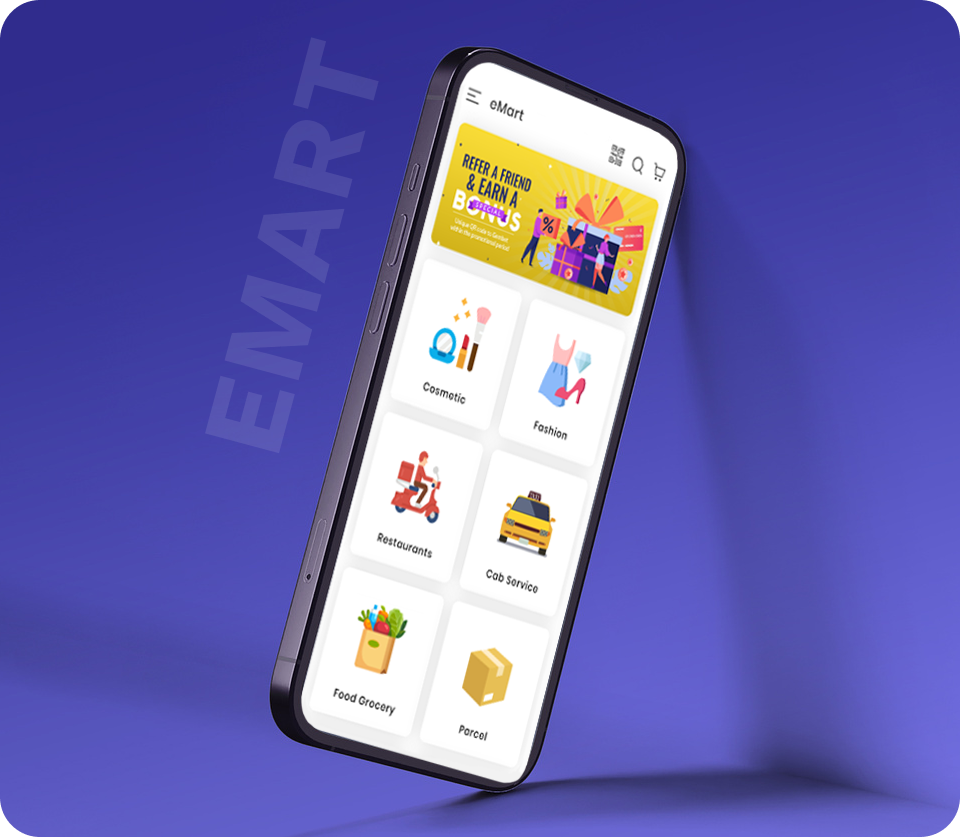
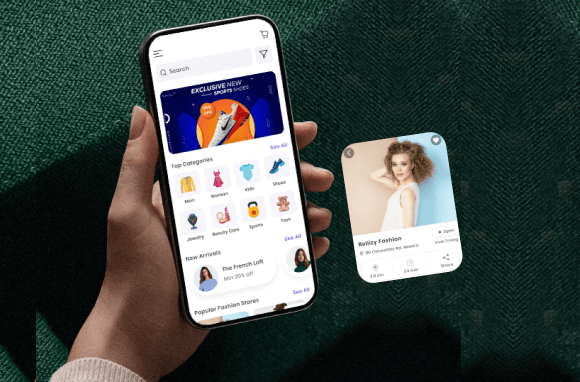
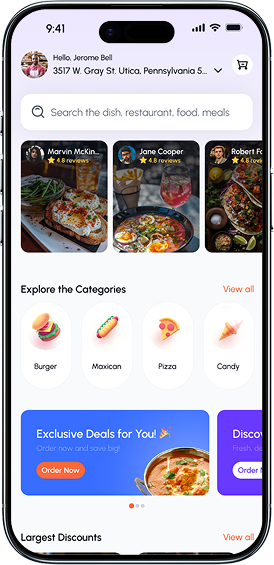
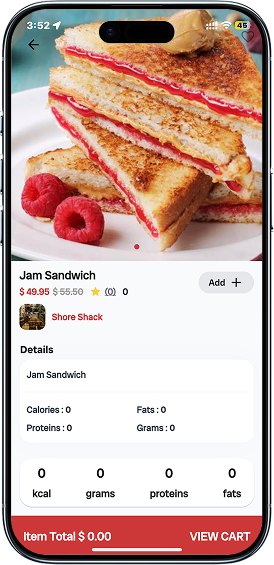
Introducing eMart, your one-stop destination for all your online shopping needs! Whether you’re looking for the latest fashion trends, cutting-edge gadgets, or everyday essentials, we’ve got you covered.

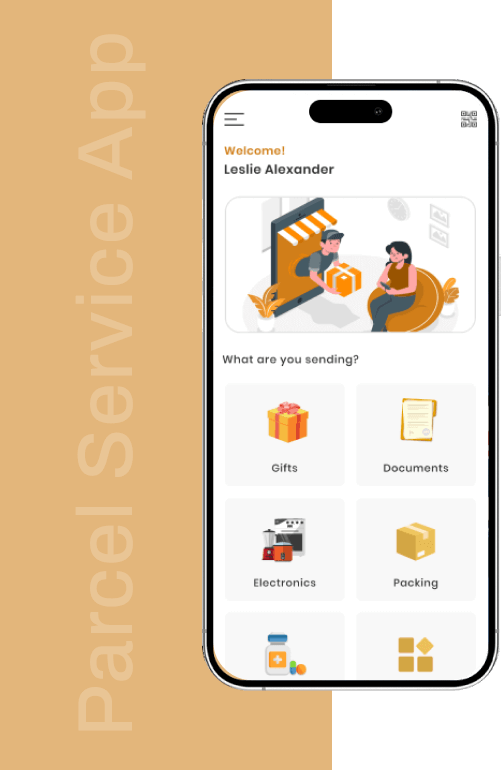
Parcel Service App

The Parcel Service App revolutionizes the way you handle package deliveries. Seamlessly integrating convenience and efficiency, this app simplifies the entire parcel delivery process for both senders and recipients.

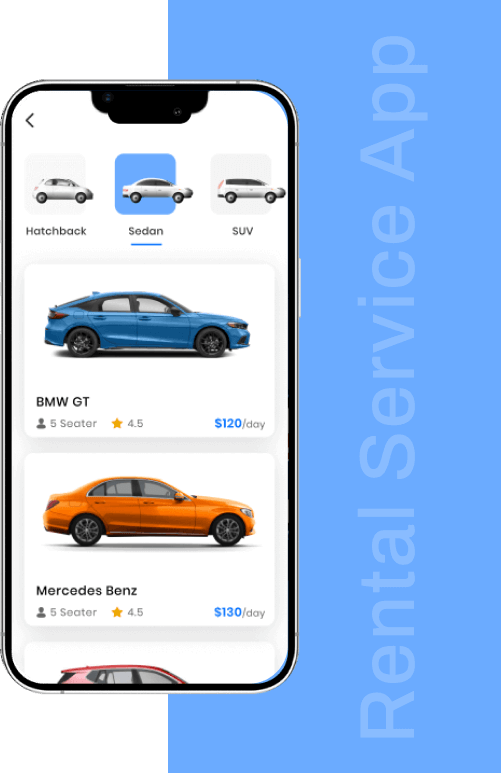
Rental Service App

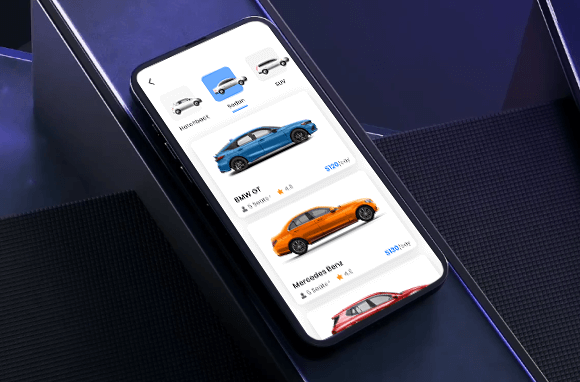
The Car Renal Service App is a comprehensive digital platform designed to streamline and enhance the car rental experience for both customers and rental service providers. With user-friendly interfaces and advanced features.

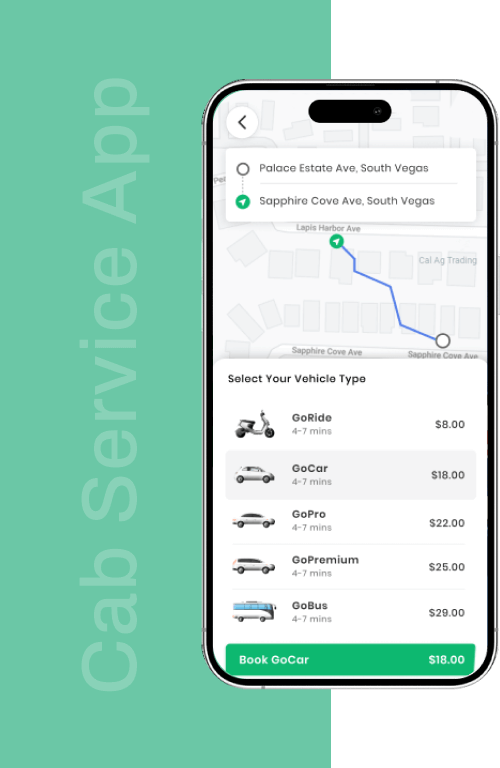
Cab Service App

Introducing our cutting-edge Cab Service App, your ultimate companion for hassle-free transportation. With our user-friendly interface and seamless booking process, traveling around City has never been easier.

OnDemand Service App

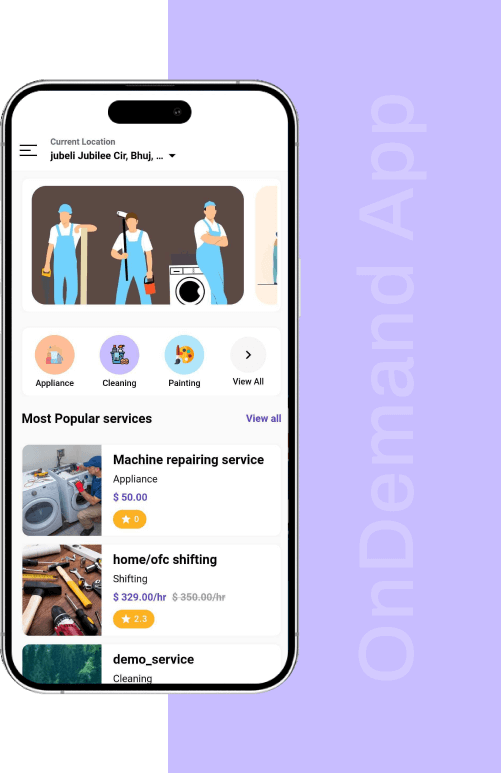
The OnDemand Service App revolutionizes the way you access essential services with just a few taps on your device. Whether you need a ride, a meal delivered, groceries picked up, or a handyman to fix something at home, this app is your go-to solution.

Exclusive Features

Modern Design

odern design embraces simplicity in form and function. Unnecessary ornamentation is avoided, resulting in clean, uncluttered spaces.
Completely Customizable

Completely Customizable`` denotes a product or service that offers extensive flexibility and adaptability according to individual preferences, needs, or specifications.

Fully Responsive UI

The layout adjusts dynamically based on the screen size and resolution, ensuring that content remains visually appealing and easily accessible regardless of the device being used.

Easy to Integrate

Easy to Integrate`` refers to a product, service, or solution that seamlessly integrates with existing systems, platforms, or workflows with minimal effort.

Real Time Tracking System

A Real Time Tracking System is a technology-driven solution that allows users to monitor and locate objects, vehicles, or people in real-time.

Exclusive Features

Exclusive features are distinctive functionalities or characteristics that set a product, service, or experience apart from others in its category.

emart-multi-vendor-image-1
<ul class="list"> <li class="item"> <h3>Dynamic Slider</h3> Our slider adapts to your preferences, making every swipe a delightful discovery.</li> <li class="item"> <h3>Categorized Items</h3> In this page customer can see vivid variety in grocery items category like fruits, vegetables, dai...
emart-multi-vendor-image-2
<ul class="list"> <li class="item"> <h3>Image Slider</h3> Product Image Slider feature, designed to elevate your multivendor experience to new heights.</li> <li class="item"> <h3>Favorite Product</h3> With our 'Favorite Product' option, you can effortlessly curate your own personal wishlis...
emart-multi-vendor-image-3
<ul class="list"> <li class="item"> <h3>Product Details</h3> Product details providing customers with vital information to make informed purchasing decisions.</li> <li class="item"> <h3>Product Reviews</h3> Product reviews are the lifeblood of any multivendor app, offering valuable insight...
emart-multi-vendor-image-4
<ul class="list"> <li class="item"> <h3>Find Nearest Store</h3> Discover the convenience of finding the nearest physical store to fulfill your shopping needs.</li> <li class="item"> <h3>Store Info</h3> Providing comprehensive details about store to enhance customer experience and foster tr...
emart-multi-vendor-image-5
<ul class="list"> <li class="item"> <h3>Cart Products</h3> This section serves as a virtual shopping basket where users can gather items they intend to purchase.</li> <li class="item"> <h3>Manage Cart</h3> Customers can conveniently add, remove, or adjust quantities of desired items in the...
emart-multi-vendor-image-6
<ul class="list"> <li class="item"> <h3>Cart Products</h3> This section serves as a virtual shopping basket where users can gather items they intend to purchase.</li> <li class="item"> <h3>Manage Cart</h3> Customers can conveniently add, remove, or adjust quantities of desired items in the...
emart-multi-vendor-image-7
<ul class="list"> <li class="item"> <h3>Offers List</h3> Browse our Offers List for exclusive deals and discounts on a wide range of products!</li> <li class="item"> <h3>Discount Label</h3> Unlock exclusive savings offers on your favorite products with our Discount Label.</li> <li class...
multivendor_store_img1
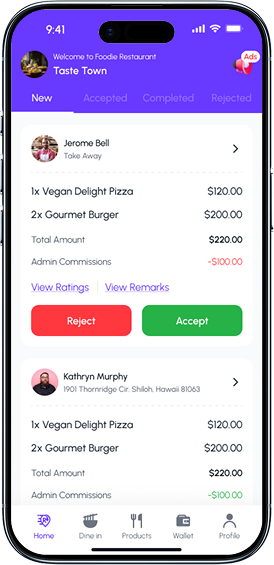
<ul class="list"> <li class="item"> <h3>New Order Management</h3> Easily review all newly placed customer orders with real-time updates, allowing quick decision-making and smooth workflow management.</li> <li class="item"> <h3>Accept/Reject Orders</h3> Approve or decline orders instantly b...
multivendor_store_img2
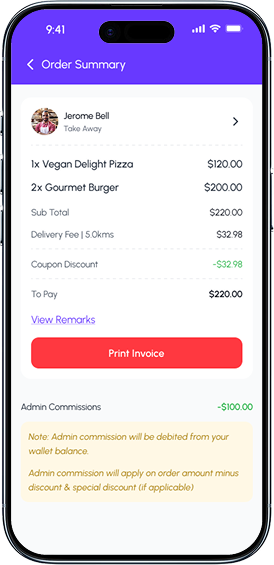
<ul class="list"> <li class="item"> <h3>Detailed Order Breakdown</h3> Displays a clear and itemized list of all products ordered, along with quantities and pricing for full transparency.</li> <li class="item"> <h3>Sub Total & Delivery Fee Display</h3> Presents an accurate calculation o...
multivendor_store_img3
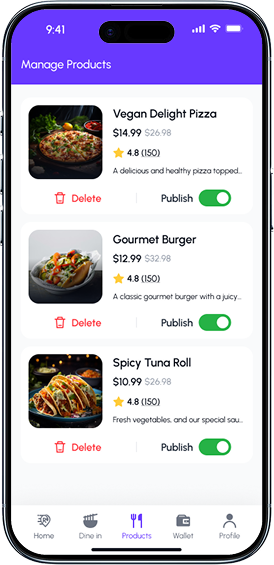
<ul class="list"> <li class="item"> <h3>Product Overview Card</h3> Each product is displayed in a clean, structured card showing the image, name, pricing, rating, and short description for easy management.</li> <li class="item"> <h3>Product Rating & Reviews</h3> Displays product rating...
multivendor_store_img4
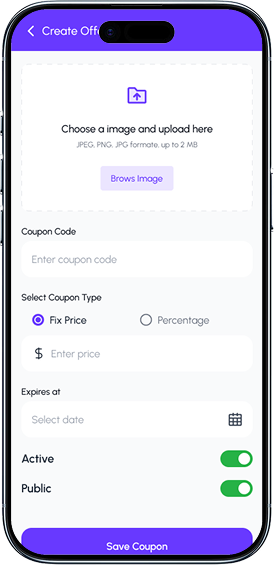
<ul class="list"> <li class="item"> <h3>Image Upload for Offer Banner</h3> Allows sellers to upload a promotional image to visually represent the coupon, making offers more attractive to customers.</li> <li class="item"> <h3>Flexible Coupon Type Selection</h3> Choose between Fixed Price Di...
multivendor_store_img5
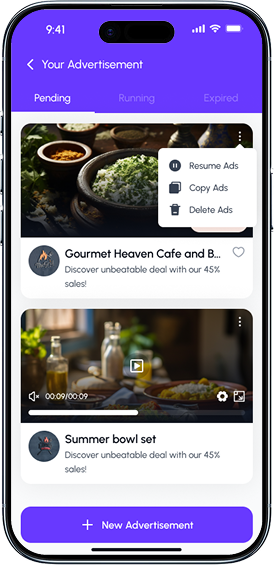
<ul class="list"> <li class="item"> <h3>Organized Ad Status Tabs</h3> Easily navigate between Pending, Running, and Expired advertisements for streamlined campaign management.</li> <li class="item"> <h3>Ad Preview Cards</h3> Each advertisement is displayed with an image or video preview, h...
multivendor_driver_img1
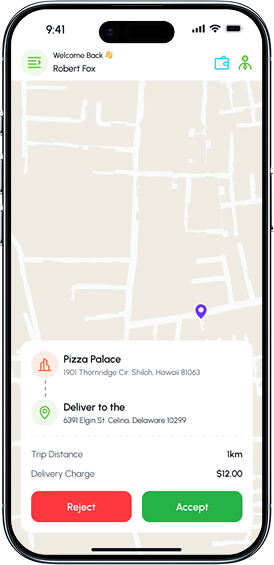
<ul class="list"> <li class="item"> <h3>Accept / Reject Order Options</h3> Provides simple, high-visibility buttons for drivers to accept or decline delivery requests instantly.</li> <li class="item"> <h3>Interactive Map View</h3> Displays the delivery location and surrounding route on a c...
multivendor_driver_img2
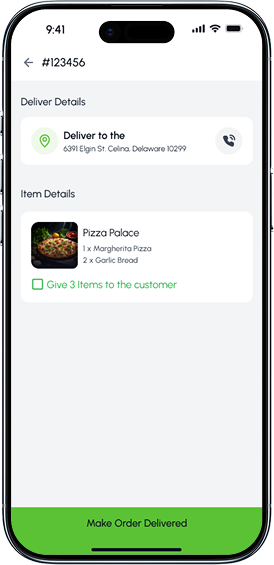
<ul class="list"> <li class="item"> <h3>Order ID Display</h3> Shows the unique order number at the top, helping drivers quickly identify and verify the correct delivery task.</li> <li class="item"> <h3>Customer Delivery Details</h3> Provides the exact delivery address along with a dedicate...
multivendor_driver_img3
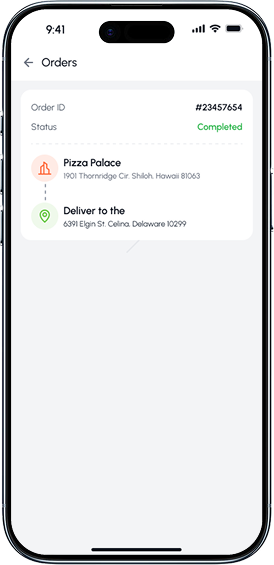
<ul class="list"> <li class="item"> <h3>Order ID Display</h3> Shows a unique order identifier for quick tracking and reference, helping users easily locate past orders.</li> <li class="item"> <h3>Order Status Indicator</h3> A clear status label (Completed) displayed in green to visually co...
multivendor_driver_img4
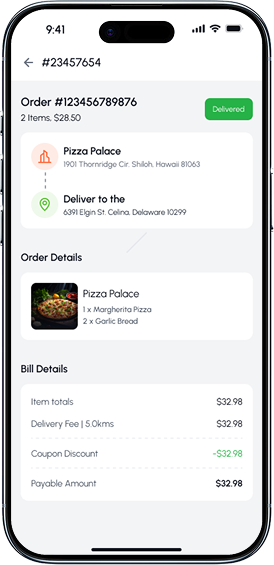
<ul class="list"> <li class="item"> <h3>Comprehensive Order Summary</h3> Displays the order number, total item count, and order value upfront, giving users a quick overview of the purchase.</li> <li class="item"> <h3>Delivery Status Badge</h3> A clear, color-coded indicator (Delivered) tha...
multivendor_driver_img5
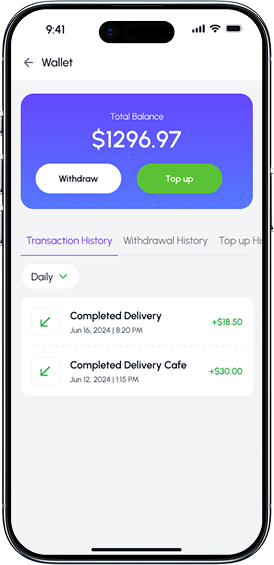
<ul class="list"> <li class="item"> <h3>Total Balance Overview</h3> Displays the user’s current wallet balance in a visually highlighted section for instant financial insight.</li> <li class="item"> <h3>Withdraw & Top-Up Actions</h3> Provides quick access buttons to withdraw earnings...
emart-e-commerce-cust-image-1
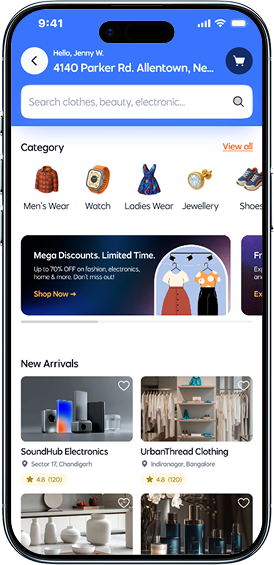
<ul class="list"> <li class="item"> <h3>Category Quick Access</h3> Horizontal category icons enable fast navigation to popular product segments such as Men’s Wear, Watches, Ladies Wear, Jewellery, and Shoes.</li> <li class="item"> <h3>Promotional Offer Banner</h3> A visually engaging pro...
emart-e-commerce-cust-image-2
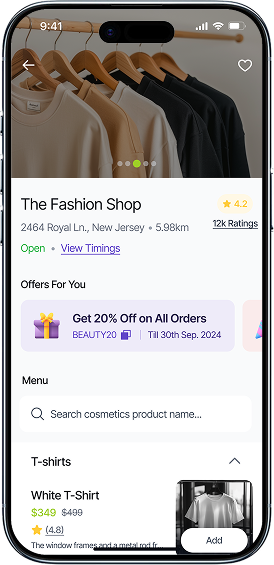
<ul class="list"> <li class="item"> <h3>Store Banners</h3> A visually appealing header image showcases the store’s theme and product style, enhancing brand identity.</li> <li class="item"> <h3>Store Information Section</h3> Displays store name, address, distance, and rating details clear...
emart-e-commerce-cust-image-3
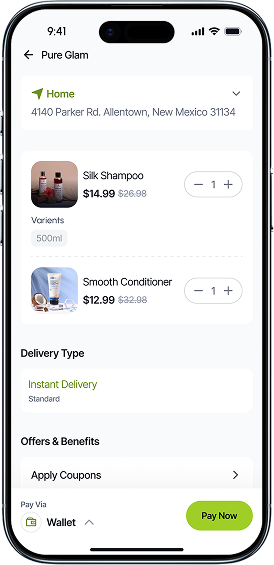
<ul class="list"> <li class="item"> <h3>Saved Delivery Address</h3> Displays the user’s selected delivery location at the top for quick confirmation, with an option to expand and change the address easily.</li> <li class="item"> <h3>Product List with Variants</h3> Shows all items added t...
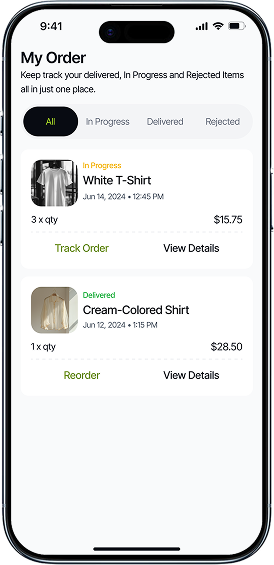
emart-e-commerce-cust-image-4
<ul class="list"> <li class="item"> <h3>Order Status Tabs</h3> Organized tabs for All, In Progress, Delivered, and Rejected orders help users filter and manage their purchase history effortlessly.</li> <li class="item"> <h3>Order Summary Cards</h3> Each order card displays product image, i...
emart-e-commerce-cust-image-5
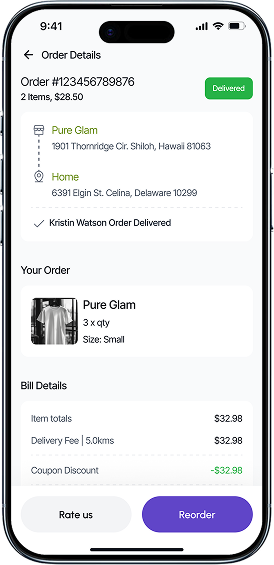
<ul class="list"> <li class="item"> <h3>Detailed Order Summary</h3> Displays the order number, total items, and amount clearly, helping users quickly understand their purchase information.</li> <li class="item"> <h3>Delivery Status Badge</h3> A visible “Delivered” label confirms the su...
e-commerce_store_img1
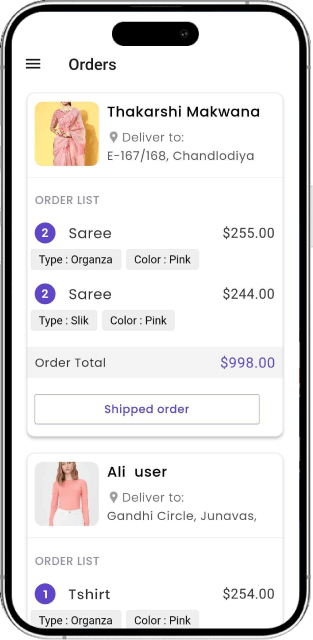
<ul class="list"> <li class="item"> <h3>Order List</h3> App provides users with a comprehensive overview of their past purchases and order history.</li> <li class="item"> <h3>Order Details</h3> app typically include comprehensive information about a customer's purchase.</li> <li class="...
e-commerce_store_img2
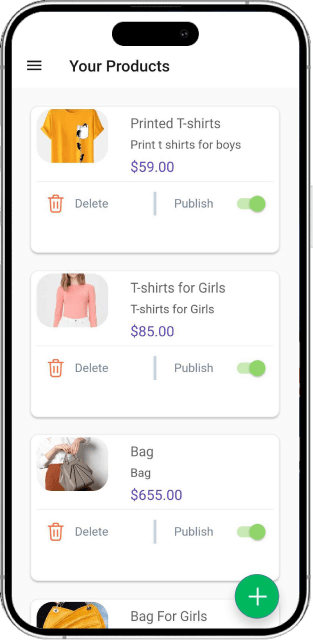
<ul class="list"> <li class="item"> <h3>Product List</h3> The store owner can view the list of product which is listed by store owner</li> <li class="item"> <h3>Delete Product</h3> Sellers with the capability to remove products from the platform's inventory</li> <li class="item"> <h3>P...
e-commerce_store_img3
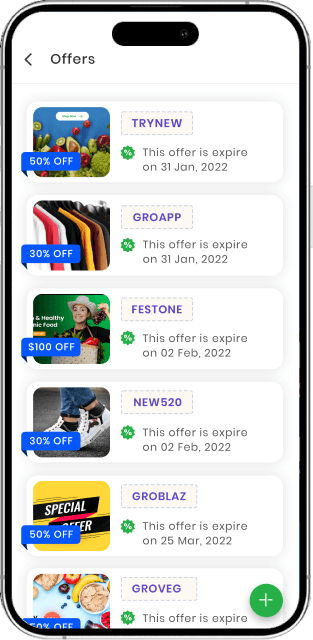
<ul class="list"> <li class="item"> <h3>Offers List</h3> Browse our Offers List for exclusive deals and discounts on a wide range of products!</li> <li class="item"> <h3>Discount Price</h3> Unlock exclusive savings offers on your favorite products with our Discount Price.</li> <li class...
e-commerce_store_img4
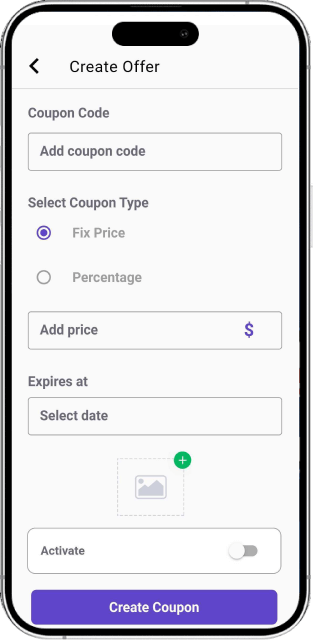
<ul class="list"> <li class="item"> <h3>Coupon Code</h3> Effortlessly create custom codes to boost sales and enhance customer engagement.</li> <li class="item"> <h3>Coupon Types</h3> Unlock savings with our diverse range of coupon types of fix price or percentage offer.</li> <li class="...
e-commerce_store_img5
<ul class="list"> <li class="item"> <h3>Withdraw Payment</h3> Securely withdraw earnings from your the app with quick and ease access.</li> <li class="item"> <h3>Wallet Balance</h3> app allows users to store funds within their account for convenient and swift transactions.</li> <li clas...
emart-parcel-image-1
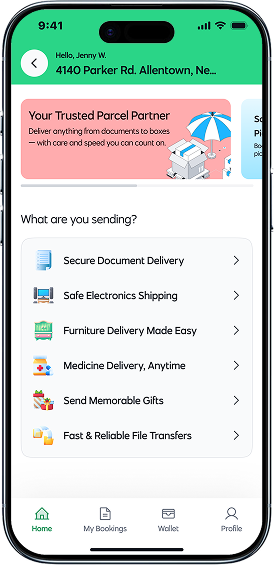
<ul class="list"> <li class="item"> <h3>Personalized User Greeting</h3> Displays the user’s name and saved address to create a familiar and personalized parcel booking experience.</li> <li class="item"> <h3>Service Highlight Banner</h3> A visually appealing promo banner introduces the pa...
emart-parcel-image-2
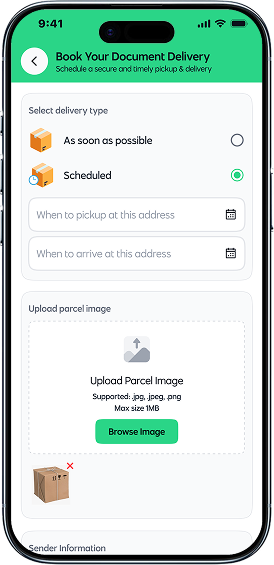
<ul class="list"> <li class="item"> <h3>Flexible Delivery Type Selection</h3> Users can choose between As soon as possible or Scheduled delivery, providing full control over pickup and drop-off timing.</li> <li class="item"> <h3>Scheduled Date & Time Picker</h3> When scheduling a deliv...
emart-parcel-image-3
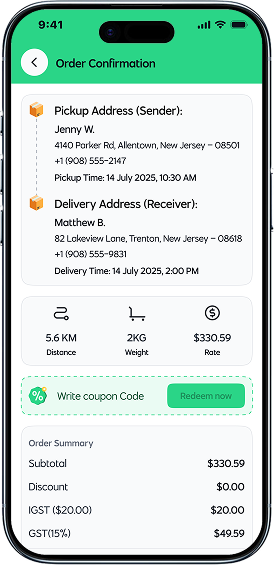
<ul class="list"> <li class="item"> <h3>Sender & Receiver Address Details</h3> Displays complete pickup and delivery addresses, including names, phone numbers, and exact scheduled timings for full clarity.</li> <li class="item"> <h3>Pickup & Delivery Timings Overview</h3> Shows cle...
emart-parcel-image-4
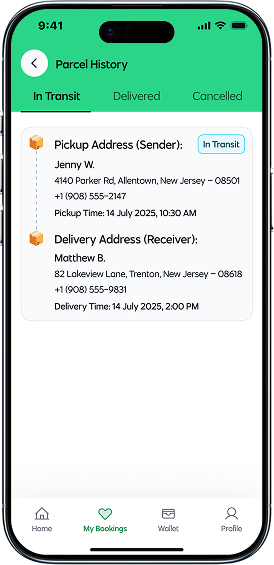
<ul class="list"> <li class="item"> <h3>Organized Parcel History Tabs</h3> Users can switch between In Transit, Delivered, and Cancelled tabs, offering a clear and intuitive way to track all parcel statuses.</li> <li class="item"> <h3>Real-Time Delivery Status Tag</h3> A visible status lab...
emart-parcel-image-5
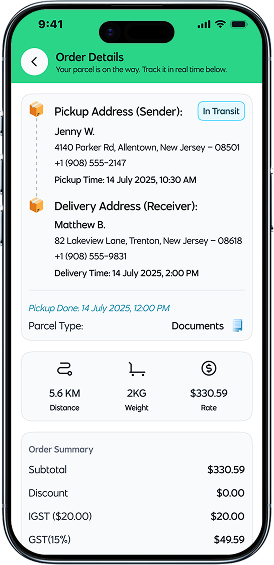
<ul class="list"> <li class="item"> <h3>Live Delivery Status Indicator</h3> A clear “In Transit” badge instantly shows the current stage of the delivery, helping users understand progress at a glance.</li> <li class="item"> <h3>Complete Pickup & Delivery Details</h3> Both sender an...
parcel_shipper_img1
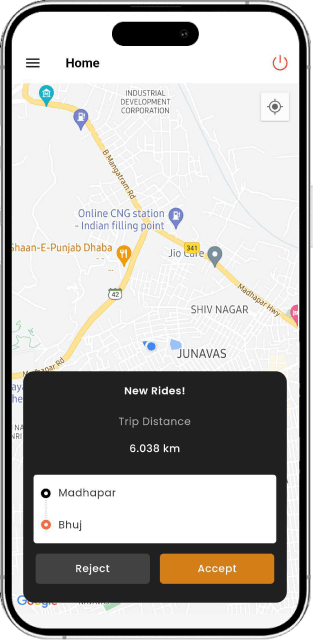
<ul class="list"> <li class="item"> <h3>Driver Availability </h3> Driver can ensures timely enable or disable their availability for work </li> <li class="item"> <h3>Trip Distance</h3> It helps driver gauge the length of their journey and is a crucial factor in determining the fare for the...
parcel_shipper_img2
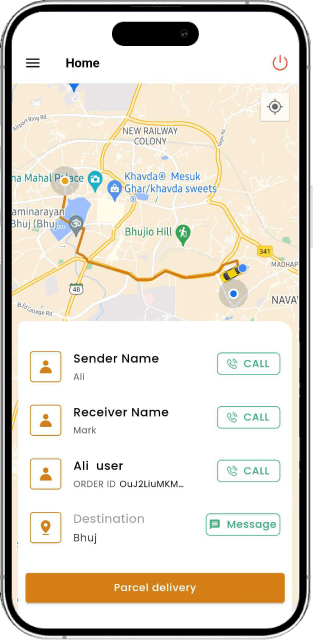
<ul class="list"> <li class="item"> <h3>Sender and Reciever Details</h3> Verify essential sender and receiver information for a secure and pleasant parcel service experience.</li> <li class="item"> <h3>Customer Destination</h3> Your destination for hassle-free parcel delivery. Enjoy swift,...
parcel_shipper_img3
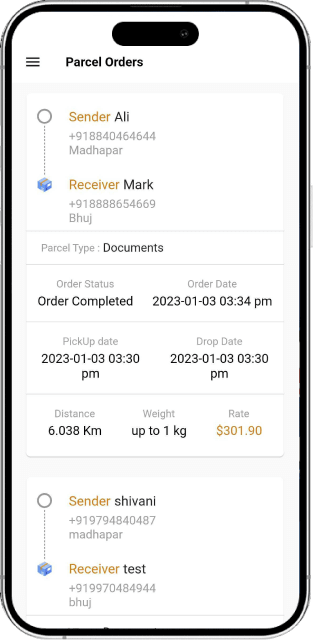
<ul class="list"> <li class="item"> <h3>Orders History</h3> Keep track of your orders with accessible records of your past orders.</li> <li class="item"> <h3>Customer Details</h3> This section gathers essential information about sender and receiver availing service.</li> <li class="item...
parcel_shipper_img4
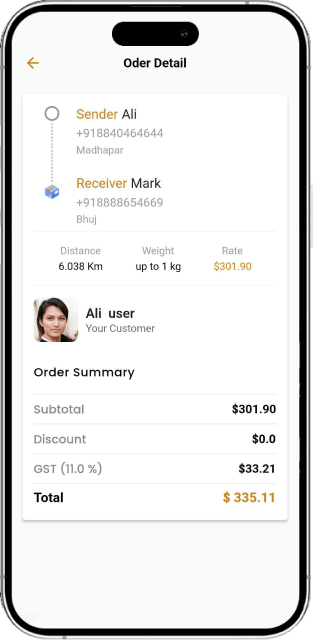
<ul class="list"> <li class="item"> <h3>Order Details</h3> Keep track of your journey with accessible records of your past rides</li> <li class="item"> <h3>Customer Details</h3> Easily view past trips customer detail like name, image, dates, destinations, fares, and driver information.</li...
parcel_shipper_img5
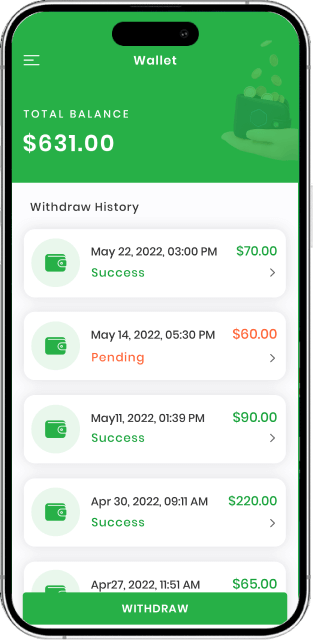
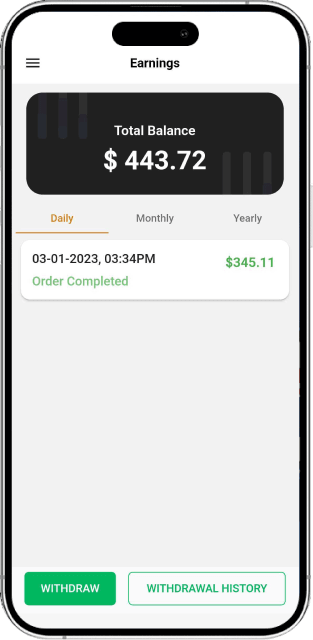
<ul class="list"> <li class="item"> <h3>Total Balance</h3> app allows users to store funds within their account for convenient and swift transactions.</li> <li class="item"> <h3>Transaction History</h3> App provides users with a comprehensive overview of their past financial transactions.<...
rental_customer_img1
<ul class="list"> <li class="item"> <h3>Auto-Detected Current Location</h3> Displays the user’s current location automatically, helping them start the booking process quickly and accurately.</li> <li class="item"> <h3>Vehicle Type Selection</h3> A clear list of available vehicle options ...
rental_customer_img2
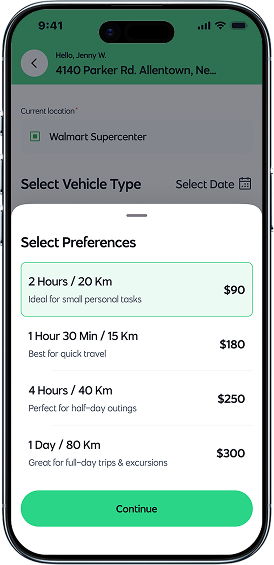
<ul class="list"> <li class="item"> <h3>Multiple Time & Distance Packages</h3> Users can choose from tailored ride packages such as 2 Hours / 20 Km or 1 Day / 80 Km, depending on their needs.</li> <li class="item"> <h3>Clear Pricing for Each Package</h3> Every preference option promine...
rental_customer_img3
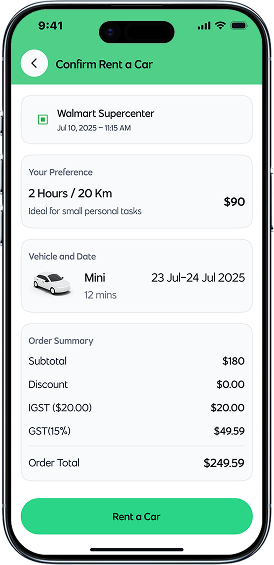
<ul class="list"> <li class="item"> <h3>Pickup Location & Time Summary</h3> Shows the selected pickup location along with the exact date and time, allowing users to quickly verify their starting point before confirming.</li> <li class="item"> <h3>Selected Preference Overview</h3> Displ...
rental_customer_img4
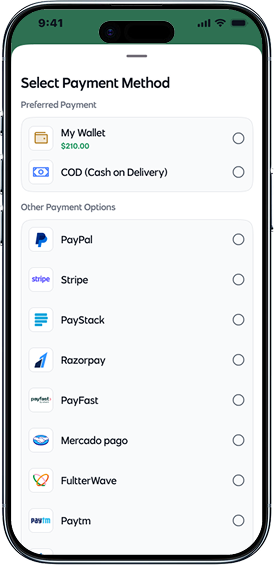
<ul class="list"> <li class="item"> <h3>Preferred Payment Section</h3> Displays the user’s most commonly used or convenient payment options such as Wallet Balance and Cash on Delivery, making checkout faster and simpler.</li> <li class="item"> <h3>Wallet Balance Overview</h3> Shows avail...
rental_driver_img1
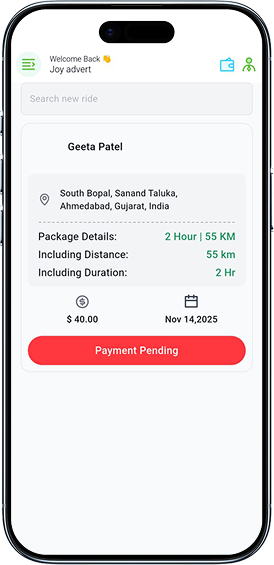
<ul class="list"> <li class="item"> <h3>Quick Ride Search Bar</h3> Allows users to instantly search for ongoing, past, or upcoming rides, improving navigation and usability.</li> <li class="item"> <h3>Rider Information Card</h3> Displays the customer’s name clearly at the top of the card...
rental_driver_img2
<ul class="list"> <li class="item"> <h3>Live Ride Status Indicator</h3> A clear In Transit badge highlights that the ride is currently active and in progress, giving users instant status visibility.</li> <li class="item"> <h3>Pickup Location Overview</h3> Displays the full pickup address a...
rental_driver_img3
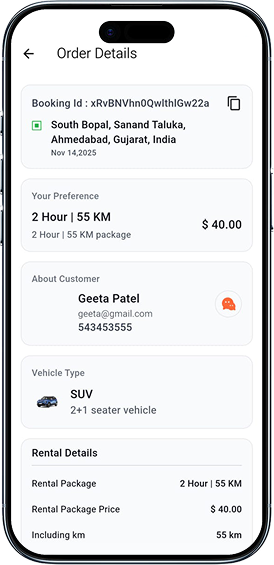
<ul class="list"> <li class="item"> <h3>Booking ID & Quick Copy Option</h3> Displays the unique booking ID with a one-tap copy icon, making it easy for users to share or reference their booking details.</li> <li class="item"> <h3>Pickup Location & Date Summary</h3> Shows the exact ...
rental_driver_img4
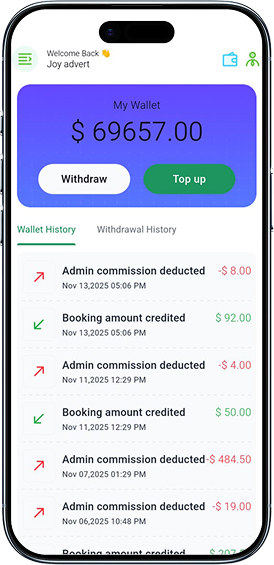
<ul class="list"> <li class="item"> <h3>Real-Time Wallet Balance Display</h3> Shows the user’s current wallet balance in a bold, card-style header, giving instant visibility of available funds.</li> <li class="item"> <h3>Quick Actions: Withdraw & Top Up</h3> Two prominently placed bu...
cab_customer_img1
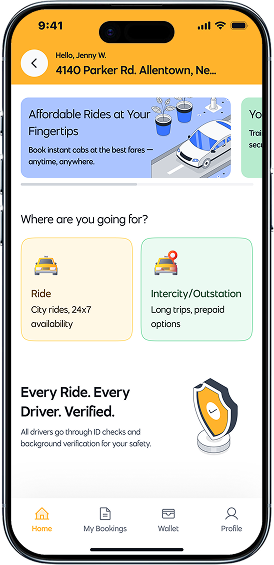
<ul class="list"> <li class="item"> <h3>Smart Location Display</h3> Shows the user’s active location at the top, helping them quickly verify where the ride booking will start.</li> <li class="item"> <h3>Promotional Banners</h3> Eye-catching banners showcase offers like Affordable Rides a...
cab_customer_img2
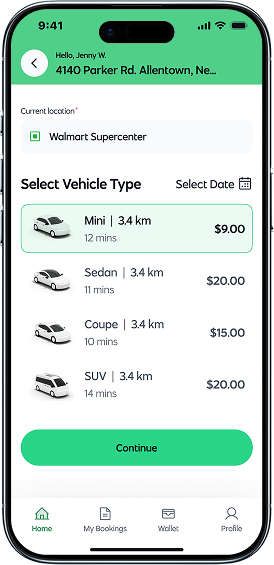
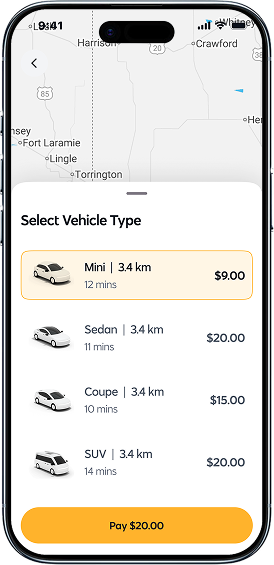
<ul class="list"> <li class="item"> <h3>Real-Time Vehicle Information</h3> Each vehicle option displays live details such as distance (3.4 km) and estimated arrival time, helping users make quick decisions.</li> <li class="item"> <h3>Cab Details</h3> Access essential information about your...
cab_customer_img3
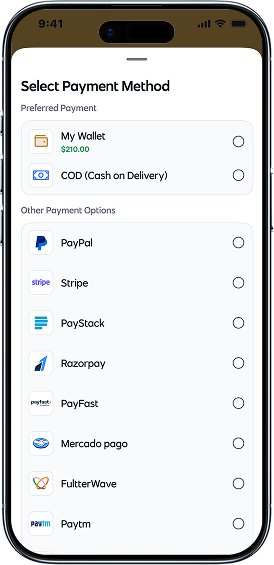
<ul class="list"> <li class="item"> <h3>Preferred Payment Section</h3> Displays the user’s most commonly used or convenient payment options such as Wallet Balance and Cash on Delivery, making checkout faster and simpler.</li> <li class="item"> <h3>Wallet Balance Overview</h3> Shows avail...
cab_customer_img4
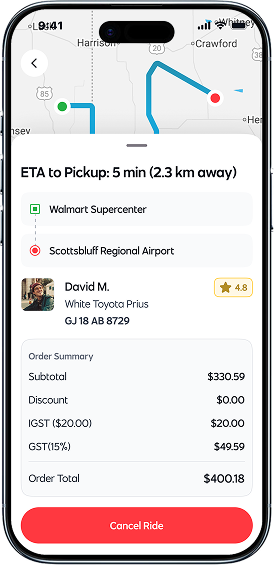
<ul class="list"> <li class="item"> <h3>Live ETA to Pickup</h3> Displays real-time estimated arrival (e.g., 5 min, 2.3 km away), giving users clarity and confidence as their driver approaches.</li> <li class="item"> <h3>Pickup & Drop Location Overview</h3> Shows both pickup and destina...
cab_customer_img5
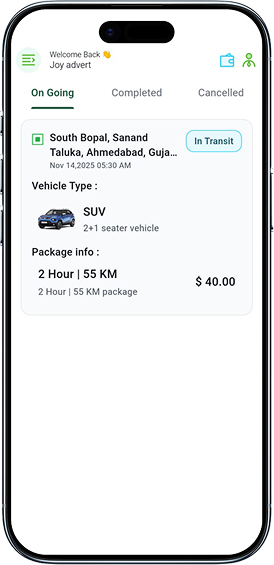
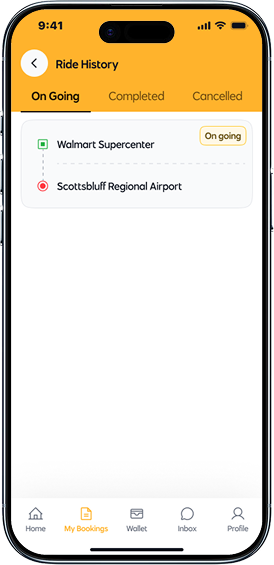
<ul class="list"> <li class="item"> <h3>Three-Tab Ride Managemen</h3> Users can switch between On Going, Completed, and Cancelled rides, making it easy to access past and active bookings.</li> <li class="item"> <h3>Clean Ongoing Ride Card</h3> Displays active rides in a neat card format, s...
cab_customer_img6
<ul class="list"> <li class="item"> <h3>Driver Details</h3> Access essential information about your driver, including their name, photo and ratings.</li> <li class="item"> <h3>Cab Details</h3> Access essential information about your cab including their car model, car number etc</li> <li...
cab_driver_img1
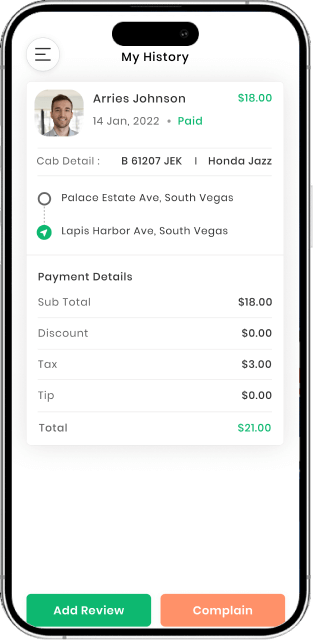
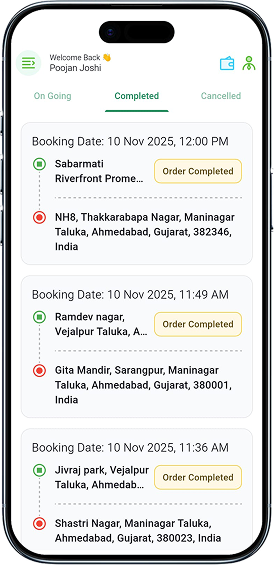
<ul class="list"> <li class="item"> <h3>Booking Timeline Overview</h3> Displays each completed booking with its exact date and time, helping users quickly review past rides.</li> <li class="item"> <h3>Clear Pickup & Drop Details</h3> Each ride card shows the pickup and drop-off locatio...
cab_driver_img2
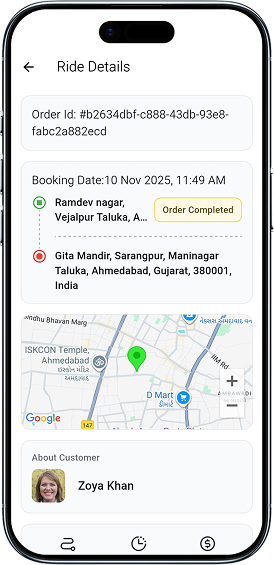
<ul class="list"> <li class="item"> <h3>Live Ride Status Indicator</h3> A clear In Transit badge highlights that the ride is currently active and in progress, giving users instant status visibility.</li> <li class="item"> <h3>Pickup Location Overview</h3> Displays the full pickup address a...
cab_driver_img3
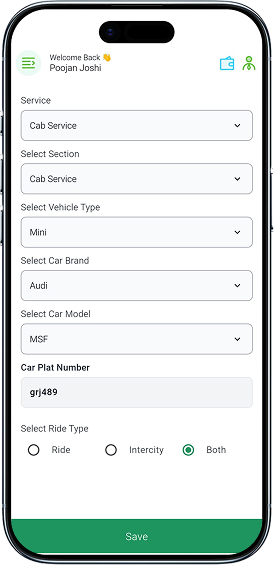
<ul class="list"> <li class="item"> <h3>Service Selection</h3> Allows drivers to choose the desired service category, ensuring accurate configuration for cab operations.</li> <li class="item"> <h3>Vehicle Type Selection</h3> Choose from multiple vehicle types such as Mini, Sedan, or SUV to...
cab_driver_img4
<ul class="list"> <li class="item"> <h3>Real-Time Wallet Balance Display</h3> Shows the user’s current wallet balance in a bold, card-style header, giving instant visibility of available funds.</li> <li class="item"> <h3>Quick Actions: Withdraw & Top Up</h3> Two prominently placed bu...
emart-on-demand-image-1
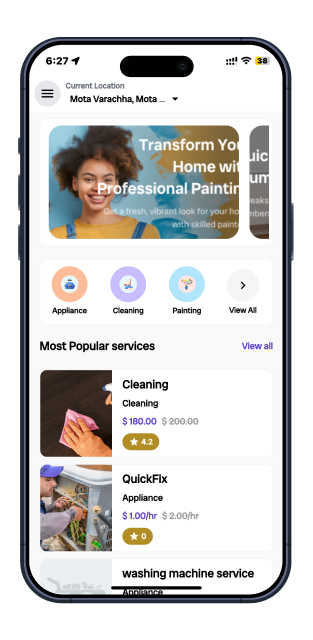
<ul class="list"> <li class="item"> <h3>Dynamic Slider</h3> Our slider adapts to your preferences, making every swipe a delightful discovery.</li> <li class="item"> <h3>Categorized Items</h3> In this page customer can see vivid variety like appliance, cleaning, painting, cab service etc.</...
emart-on-demand-image-2
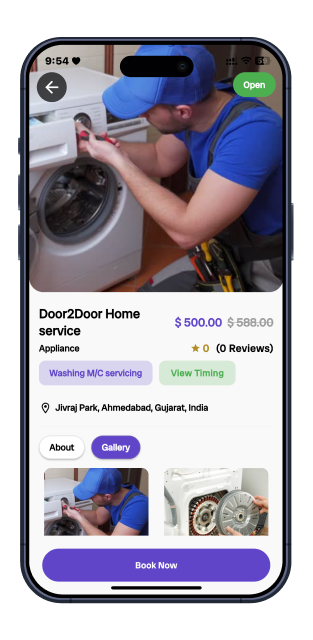
<ul class="list"> <li class="item"> <h3>Image Slider</h3> Product Image Slider feature, designed to elevate your multivendor experience to new heights.</li> <li class="item"> <h3>Service Details</h3> From prompt service to expert assistance, our service guarantees convenience, reliability,...
emart-on-demand-image-3
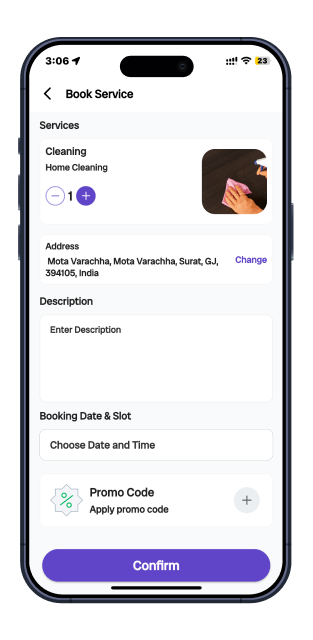
<ul class="list"> <li class="item"> <h3>Book Service</h3> Whether it's plumbing, electrical work, home cleaning, or any other service, our platform connects you.</li> <li class="item"> <h3>Service Details</h3> From prompt service to expert assistance you can confirm your service.</li> <...
on_demand_customer_img4
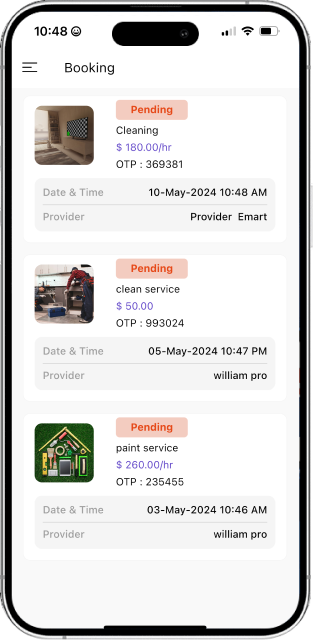
<ul class="list"> <li class="item"> <h3>Booking History</h3> Keep track of your orders with accessible records of your past orders.</li> <li class="item"> <h3>Service Details</h3> Your service reservation, including service type, date, time, and any specific requests you've provided.</li> ...
on_demand_customer_img5
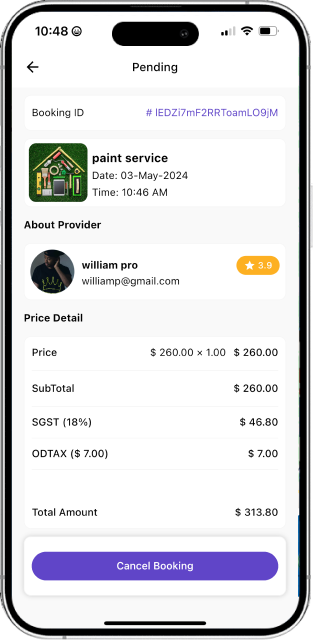
<ul class="list"> <li class="item"> <h3>Booking Details</h3> Your service reservation, including service type, date, time, and any specific requests you've provided.</li> <li class="item"> <h3>About Provider</h3> Providing comprehensive details about service provider to enhance customer ex...
on_demand_worker_img1
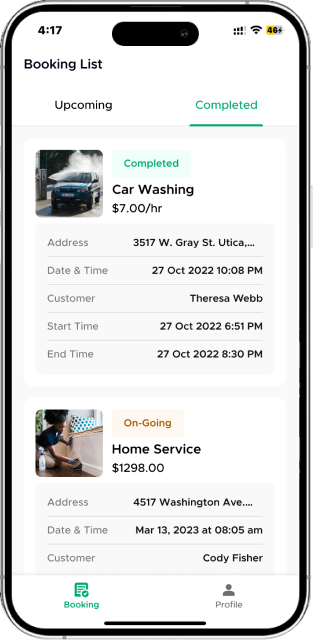
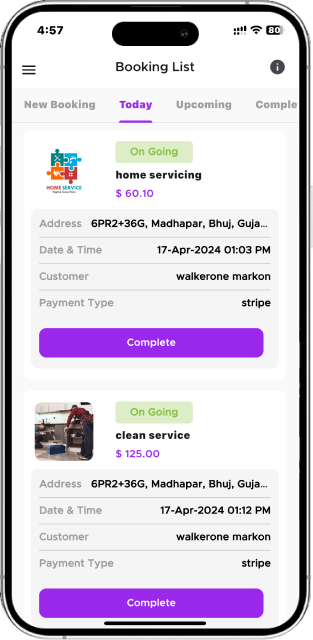
<ul class="list"> <li class="item"> <h3>Booking History</h3> Keep track of your orders with accessible records of your past orders.</li> <li class="item"> <h3>Booking Status</h3> Worker can track the progress of their booked on-demand service.</li> <li class="item"> <h3>Booking Details...
on_demand_worker_img2
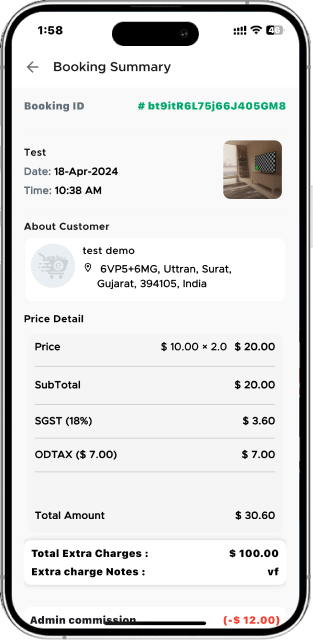
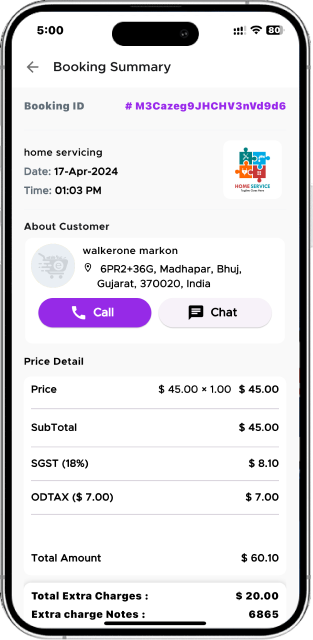
<ul class="list"> <li class="item"> <h3>Booking Details</h3> Your service reservation, including service type, date, time, and any specific requests you've received.</li> <li class="item"> <h3>Customer Details</h3> Providing comprehensive details about customer to enhance customer experien...
on_demand_worker_img3
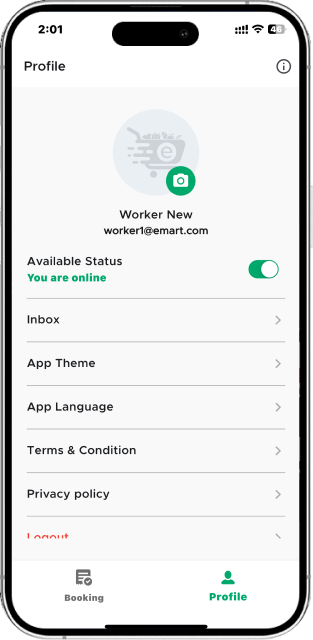
<ul class="list"> <li class="item"> <h3>Profile Details</h3> Your profile with essential information such as name, email, profile pic etc.</li> <li class="item"> <h3>Worker Availability</h3> Driver can ensures timely enable or disable their availability for work </li> <li class="item"> ...
on_demand_worker_img4
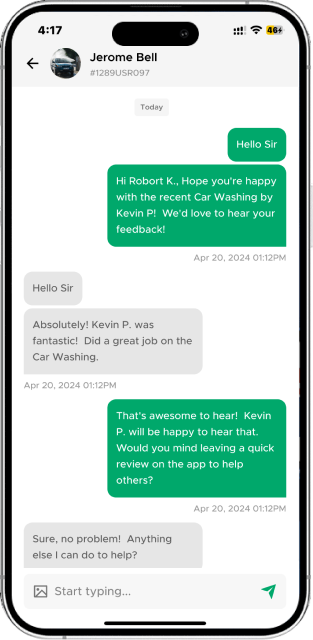
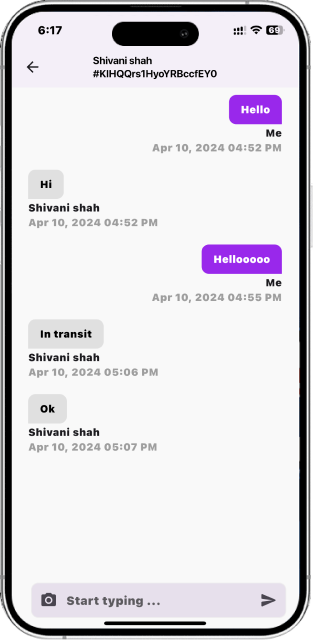
<ul class="list"> <li class="item"> <h3>Chat with Customer</h3> Customer can message to assigned Driver within the app for hassle free delivery service.</li> <li class="item"> <h3>Send Image</h3> Customer can send image to assigned Driver within the app for hassle free delivery service.</l...
on_demand_provider_img1
<ul class="list"> <li class="item"> <h3>Booking History</h3> Keep track of your booking history with accessible records of your past completed service.</li> <li class="item"> <h3>Booking Status</h3> Provider can track the progress of their booked on-demand service.</li> <li class="item"...
on_demand_provider_img2
<ul class="list"> <li class="item"> <h3>Booking Details</h3> Your service reservation, including service type, date, time, and any specific requests you've provided.</li> <li class="item"> <h3>About Customer</h3> Providing comprehensive details about customer to enhance experience.</li> ...
on_demand_provider_img3
<ul class="list"> <li class="item"> <h3>Service List</h3> Get instant access and browse all your comprehensive service List.</li> <li class="item"> <h3>Service Details</h3> Add a service details to easy for customer’s seamless and reliable solutions.</li> <li class="item"> <h3>Delete...
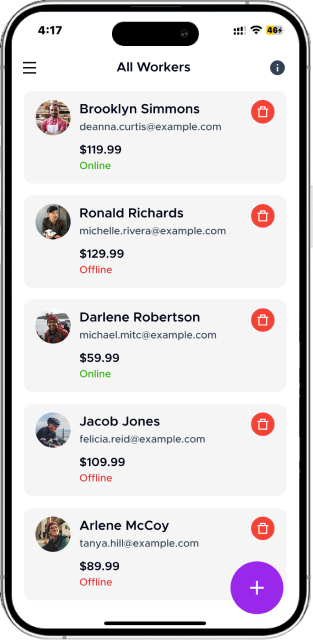
on_demand_provider_img4
<ul class="list"> <li class="item"> <h3>All Workers List</h3> Discover a diverse array of skilled professionals available at your fingertips with the All Workers List.</li> <li class="item"> <h3>Worker Details</h3> Providing comprehensive details about worker like name, email, price etc.</...
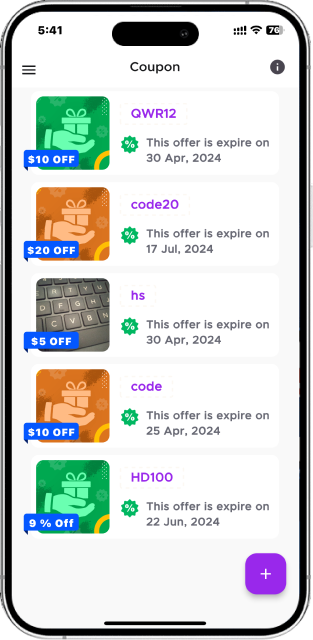
on_demand_provider_img5
<ul class="list"> <li class="item"> <h3>Offers List</h3> Browse our Offers List for exclusive deals and discounts on a wide range of services!</li> <li class="item"> <h3>Discount Label</h3> Unlock exclusive savings offers on your favorite service with our Discount Label.</li> <li class=...
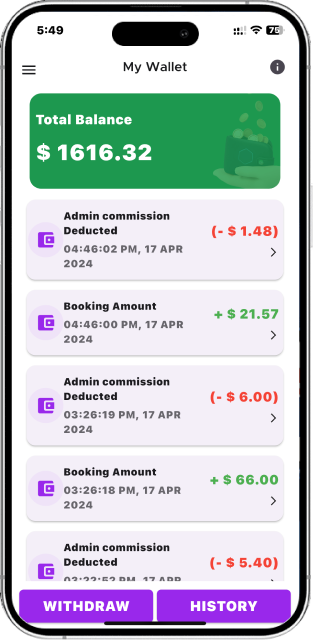
on_demand_provider_img6
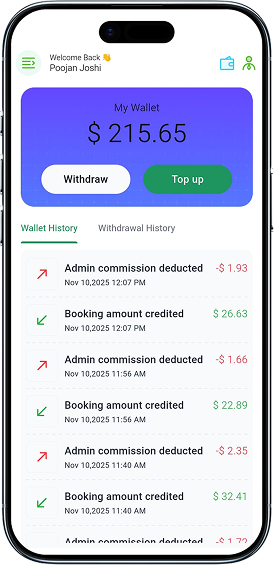
<ul class="list"> <li class="item"> <h3>Total Balance</h3> app allows users to store funds within their account for convenient and swift transactions.</li> <li class="item"> <h3>Transaction History</h3> App provides users with a comprehensive overview of their past financial transactions.<...
on_demand_provider_img7
<ul class="list"> <li class="item"> <h3>Chat with Customer</h3> Service provider can message to customer within the app for hassle free service.</li> <li class="item"> <h3>Send Image</h3> Service provider can send image to assigned worker within the app for hassle free service.</li> ...
Multi Vendor Service
emart-multi-vendor-image-1
<ul class="list"> <li class="item"> <h3>Dynamic Slider</h3> Our slider adapts to your preferences, making every swipe a delightful discovery.</li> <li class="item"> <h3>Categorized Items</h3> In this page customer can see vivid variety in grocery items category like fruits, vegetables, dai...
emart-multi-vendor-image-2
<ul class="list"> <li class="item"> <h3>Image Slider</h3> Product Image Slider feature, designed to elevate your multivendor experience to new heights.</li> <li class="item"> <h3>Favorite Product</h3> With our 'Favorite Product' option, you can effortlessly curate your own personal wishlis...
emart-multi-vendor-image-3
<ul class="list"> <li class="item"> <h3>Product Details</h3> Product details providing customers with vital information to make informed purchasing decisions.</li> <li class="item"> <h3>Product Reviews</h3> Product reviews are the lifeblood of any multivendor app, offering valuable insight...
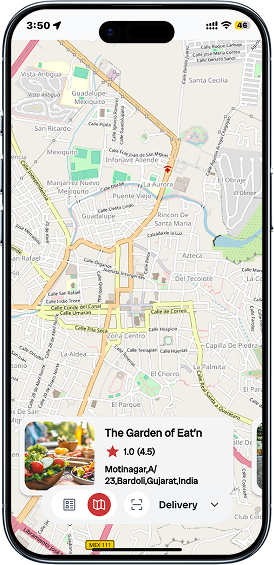
emart-multi-vendor-image-4
<ul class="list"> <li class="item"> <h3>Find Nearest Store</h3> Discover the convenience of finding the nearest physical store to fulfill your shopping needs.</li> <li class="item"> <h3>Store Info</h3> Providing comprehensive details about store to enhance customer experience and foster tr...
emart-multi-vendor-image-5
<ul class="list"> <li class="item"> <h3>Cart Products</h3> This section serves as a virtual shopping basket where users can gather items they intend to purchase.</li> <li class="item"> <h3>Manage Cart</h3> Customers can conveniently add, remove, or adjust quantities of desired items in the...
emart-multi-vendor-image-6
<ul class="list"> <li class="item"> <h3>Cart Products</h3> This section serves as a virtual shopping basket where users can gather items they intend to purchase.</li> <li class="item"> <h3>Manage Cart</h3> Customers can conveniently add, remove, or adjust quantities of desired items in the...
emart-multi-vendor-image-7
<ul class="list"> <li class="item"> <h3>Offers List</h3> Browse our Offers List for exclusive deals and discounts on a wide range of products!</li> <li class="item"> <h3>Discount Label</h3> Unlock exclusive savings offers on your favorite products with our Discount Label.</li> <li class...
multivendor_store_img1
<ul class="list"> <li class="item"> <h3>New Order Management</h3> Easily review all newly placed customer orders with real-time updates, allowing quick decision-making and smooth workflow management.</li> <li class="item"> <h3>Accept/Reject Orders</h3> Approve or decline orders instantly b...
multivendor_store_img2
<ul class="list"> <li class="item"> <h3>Detailed Order Breakdown</h3> Displays a clear and itemized list of all products ordered, along with quantities and pricing for full transparency.</li> <li class="item"> <h3>Sub Total & Delivery Fee Display</h3> Presents an accurate calculation o...
multivendor_store_img3
<ul class="list"> <li class="item"> <h3>Product Overview Card</h3> Each product is displayed in a clean, structured card showing the image, name, pricing, rating, and short description for easy management.</li> <li class="item"> <h3>Product Rating & Reviews</h3> Displays product rating...
multivendor_store_img4
<ul class="list"> <li class="item"> <h3>Image Upload for Offer Banner</h3> Allows sellers to upload a promotional image to visually represent the coupon, making offers more attractive to customers.</li> <li class="item"> <h3>Flexible Coupon Type Selection</h3> Choose between Fixed Price Di...
multivendor_store_img5
<ul class="list"> <li class="item"> <h3>Organized Ad Status Tabs</h3> Easily navigate between Pending, Running, and Expired advertisements for streamlined campaign management.</li> <li class="item"> <h3>Ad Preview Cards</h3> Each advertisement is displayed with an image or video preview, h...
multivendor_driver_img1
<ul class="list"> <li class="item"> <h3>Accept / Reject Order Options</h3> Provides simple, high-visibility buttons for drivers to accept or decline delivery requests instantly.</li> <li class="item"> <h3>Interactive Map View</h3> Displays the delivery location and surrounding route on a c...
multivendor_driver_img2
<ul class="list"> <li class="item"> <h3>Order ID Display</h3> Shows the unique order number at the top, helping drivers quickly identify and verify the correct delivery task.</li> <li class="item"> <h3>Customer Delivery Details</h3> Provides the exact delivery address along with a dedicate...
multivendor_driver_img3
<ul class="list"> <li class="item"> <h3>Order ID Display</h3> Shows a unique order identifier for quick tracking and reference, helping users easily locate past orders.</li> <li class="item"> <h3>Order Status Indicator</h3> A clear status label (Completed) displayed in green to visually co...
multivendor_driver_img4
<ul class="list"> <li class="item"> <h3>Comprehensive Order Summary</h3> Displays the order number, total item count, and order value upfront, giving users a quick overview of the purchase.</li> <li class="item"> <h3>Delivery Status Badge</h3> A clear, color-coded indicator (Delivered) tha...
multivendor_driver_img5
<ul class="list"> <li class="item"> <h3>Total Balance Overview</h3> Displays the user’s current wallet balance in a visually highlighted section for instant financial insight.</li> <li class="item"> <h3>Withdraw & Top-Up Actions</h3> Provides quick access buttons to withdraw earnings...
eCommerce Service
emart-e-commerce-cust-image-1
<ul class="list"> <li class="item"> <h3>Category Quick Access</h3> Horizontal category icons enable fast navigation to popular product segments such as Men’s Wear, Watches, Ladies Wear, Jewellery, and Shoes.</li> <li class="item"> <h3>Promotional Offer Banner</h3> A visually engaging pro...
emart-e-commerce-cust-image-2
<ul class="list"> <li class="item"> <h3>Store Banners</h3> A visually appealing header image showcases the store’s theme and product style, enhancing brand identity.</li> <li class="item"> <h3>Store Information Section</h3> Displays store name, address, distance, and rating details clear...
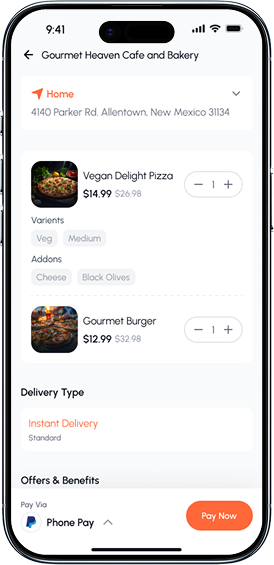
emart-e-commerce-cust-image-3
<ul class="list"> <li class="item"> <h3>Saved Delivery Address</h3> Displays the user’s selected delivery location at the top for quick confirmation, with an option to expand and change the address easily.</li> <li class="item"> <h3>Product List with Variants</h3> Shows all items added t...
emart-e-commerce-cust-image-4
<ul class="list"> <li class="item"> <h3>Order Status Tabs</h3> Organized tabs for All, In Progress, Delivered, and Rejected orders help users filter and manage their purchase history effortlessly.</li> <li class="item"> <h3>Order Summary Cards</h3> Each order card displays product image, i...
emart-e-commerce-cust-image-5
<ul class="list"> <li class="item"> <h3>Detailed Order Summary</h3> Displays the order number, total items, and amount clearly, helping users quickly understand their purchase information.</li> <li class="item"> <h3>Delivery Status Badge</h3> A visible “Delivered” label confirms the su...
e-commerce_store_img1
<ul class="list"> <li class="item"> <h3>Order List</h3> App provides users with a comprehensive overview of their past purchases and order history.</li> <li class="item"> <h3>Order Details</h3> app typically include comprehensive information about a customer's purchase.</li> <li class="...
e-commerce_store_img2
<ul class="list"> <li class="item"> <h3>Product List</h3> The store owner can view the list of product which is listed by store owner</li> <li class="item"> <h3>Delete Product</h3> Sellers with the capability to remove products from the platform's inventory</li> <li class="item"> <h3>P...
e-commerce_store_img3
<ul class="list"> <li class="item"> <h3>Offers List</h3> Browse our Offers List for exclusive deals and discounts on a wide range of products!</li> <li class="item"> <h3>Discount Price</h3> Unlock exclusive savings offers on your favorite products with our Discount Price.</li> <li class...
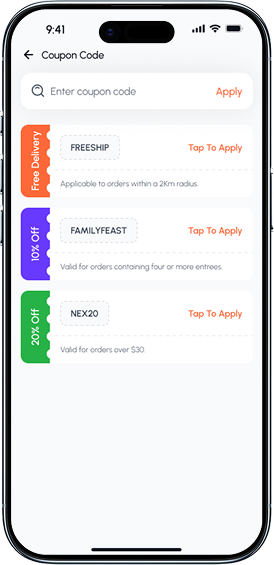
e-commerce_store_img4
<ul class="list"> <li class="item"> <h3>Coupon Code</h3> Effortlessly create custom codes to boost sales and enhance customer engagement.</li> <li class="item"> <h3>Coupon Types</h3> Unlock savings with our diverse range of coupon types of fix price or percentage offer.</li> <li class="...
e-commerce_store_img5
<ul class="list"> <li class="item"> <h3>Withdraw Payment</h3> Securely withdraw earnings from your the app with quick and ease access.</li> <li class="item"> <h3>Wallet Balance</h3> app allows users to store funds within their account for convenient and swift transactions.</li> <li clas...
Parcel Service
emart-parcel-image-1
<ul class="list"> <li class="item"> <h3>Personalized User Greeting</h3> Displays the user’s name and saved address to create a familiar and personalized parcel booking experience.</li> <li class="item"> <h3>Service Highlight Banner</h3> A visually appealing promo banner introduces the pa...
emart-parcel-image-2
<ul class="list"> <li class="item"> <h3>Flexible Delivery Type Selection</h3> Users can choose between As soon as possible or Scheduled delivery, providing full control over pickup and drop-off timing.</li> <li class="item"> <h3>Scheduled Date & Time Picker</h3> When scheduling a deliv...
emart-parcel-image-3
<ul class="list"> <li class="item"> <h3>Sender & Receiver Address Details</h3> Displays complete pickup and delivery addresses, including names, phone numbers, and exact scheduled timings for full clarity.</li> <li class="item"> <h3>Pickup & Delivery Timings Overview</h3> Shows cle...
emart-parcel-image-4
<ul class="list"> <li class="item"> <h3>Organized Parcel History Tabs</h3> Users can switch between In Transit, Delivered, and Cancelled tabs, offering a clear and intuitive way to track all parcel statuses.</li> <li class="item"> <h3>Real-Time Delivery Status Tag</h3> A visible status lab...
emart-parcel-image-5
<ul class="list"> <li class="item"> <h3>Live Delivery Status Indicator</h3> A clear “In Transit” badge instantly shows the current stage of the delivery, helping users understand progress at a glance.</li> <li class="item"> <h3>Complete Pickup & Delivery Details</h3> Both sender an...
parcel_shipper_img1
<ul class="list"> <li class="item"> <h3>Driver Availability </h3> Driver can ensures timely enable or disable their availability for work </li> <li class="item"> <h3>Trip Distance</h3> It helps driver gauge the length of their journey and is a crucial factor in determining the fare for the...
parcel_shipper_img2
<ul class="list"> <li class="item"> <h3>Sender and Reciever Details</h3> Verify essential sender and receiver information for a secure and pleasant parcel service experience.</li> <li class="item"> <h3>Customer Destination</h3> Your destination for hassle-free parcel delivery. Enjoy swift,...
parcel_shipper_img3
<ul class="list"> <li class="item"> <h3>Orders History</h3> Keep track of your orders with accessible records of your past orders.</li> <li class="item"> <h3>Customer Details</h3> This section gathers essential information about sender and receiver availing service.</li> <li class="item...
parcel_shipper_img4
<ul class="list"> <li class="item"> <h3>Order Details</h3> Keep track of your journey with accessible records of your past rides</li> <li class="item"> <h3>Customer Details</h3> Easily view past trips customer detail like name, image, dates, destinations, fares, and driver information.</li...
parcel_shipper_img5
<ul class="list"> <li class="item"> <h3>Total Balance</h3> app allows users to store funds within their account for convenient and swift transactions.</li> <li class="item"> <h3>Transaction History</h3> App provides users with a comprehensive overview of their past financial transactions.<...
Rental Service
rental_customer_img1
<ul class="list"> <li class="item"> <h3>Auto-Detected Current Location</h3> Displays the user’s current location automatically, helping them start the booking process quickly and accurately.</li> <li class="item"> <h3>Vehicle Type Selection</h3> A clear list of available vehicle options ...
rental_customer_img2
<ul class="list"> <li class="item"> <h3>Multiple Time & Distance Packages</h3> Users can choose from tailored ride packages such as 2 Hours / 20 Km or 1 Day / 80 Km, depending on their needs.</li> <li class="item"> <h3>Clear Pricing for Each Package</h3> Every preference option promine...
rental_customer_img3
<ul class="list"> <li class="item"> <h3>Pickup Location & Time Summary</h3> Shows the selected pickup location along with the exact date and time, allowing users to quickly verify their starting point before confirming.</li> <li class="item"> <h3>Selected Preference Overview</h3> Displ...
rental_customer_img4
<ul class="list"> <li class="item"> <h3>Preferred Payment Section</h3> Displays the user’s most commonly used or convenient payment options such as Wallet Balance and Cash on Delivery, making checkout faster and simpler.</li> <li class="item"> <h3>Wallet Balance Overview</h3> Shows avail...
rental_driver_img1
<ul class="list"> <li class="item"> <h3>Quick Ride Search Bar</h3> Allows users to instantly search for ongoing, past, or upcoming rides, improving navigation and usability.</li> <li class="item"> <h3>Rider Information Card</h3> Displays the customer’s name clearly at the top of the card...
rental_driver_img2
<ul class="list"> <li class="item"> <h3>Live Ride Status Indicator</h3> A clear In Transit badge highlights that the ride is currently active and in progress, giving users instant status visibility.</li> <li class="item"> <h3>Pickup Location Overview</h3> Displays the full pickup address a...
rental_driver_img3
<ul class="list"> <li class="item"> <h3>Booking ID & Quick Copy Option</h3> Displays the unique booking ID with a one-tap copy icon, making it easy for users to share or reference their booking details.</li> <li class="item"> <h3>Pickup Location & Date Summary</h3> Shows the exact ...
rental_driver_img4
<ul class="list"> <li class="item"> <h3>Real-Time Wallet Balance Display</h3> Shows the user’s current wallet balance in a bold, card-style header, giving instant visibility of available funds.</li> <li class="item"> <h3>Quick Actions: Withdraw & Top Up</h3> Two prominently placed bu...
Cab Service
cab_customer_img1
<ul class="list"> <li class="item"> <h3>Smart Location Display</h3> Shows the user’s active location at the top, helping them quickly verify where the ride booking will start.</li> <li class="item"> <h3>Promotional Banners</h3> Eye-catching banners showcase offers like Affordable Rides a...
cab_customer_img2
<ul class="list"> <li class="item"> <h3>Real-Time Vehicle Information</h3> Each vehicle option displays live details such as distance (3.4 km) and estimated arrival time, helping users make quick decisions.</li> <li class="item"> <h3>Cab Details</h3> Access essential information about your...
cab_customer_img3
<ul class="list"> <li class="item"> <h3>Preferred Payment Section</h3> Displays the user’s most commonly used or convenient payment options such as Wallet Balance and Cash on Delivery, making checkout faster and simpler.</li> <li class="item"> <h3>Wallet Balance Overview</h3> Shows avail...
cab_customer_img4
<ul class="list"> <li class="item"> <h3>Live ETA to Pickup</h3> Displays real-time estimated arrival (e.g., 5 min, 2.3 km away), giving users clarity and confidence as their driver approaches.</li> <li class="item"> <h3>Pickup & Drop Location Overview</h3> Shows both pickup and destina...
cab_customer_img5
<ul class="list"> <li class="item"> <h3>Three-Tab Ride Managemen</h3> Users can switch between On Going, Completed, and Cancelled rides, making it easy to access past and active bookings.</li> <li class="item"> <h3>Clean Ongoing Ride Card</h3> Displays active rides in a neat card format, s...
cab_customer_img6
<ul class="list"> <li class="item"> <h3>Driver Details</h3> Access essential information about your driver, including their name, photo and ratings.</li> <li class="item"> <h3>Cab Details</h3> Access essential information about your cab including their car model, car number etc</li> <li...
cab_driver_img1
<ul class="list"> <li class="item"> <h3>Booking Timeline Overview</h3> Displays each completed booking with its exact date and time, helping users quickly review past rides.</li> <li class="item"> <h3>Clear Pickup & Drop Details</h3> Each ride card shows the pickup and drop-off locatio...
cab_driver_img2
<ul class="list"> <li class="item"> <h3>Live Ride Status Indicator</h3> A clear In Transit badge highlights that the ride is currently active and in progress, giving users instant status visibility.</li> <li class="item"> <h3>Pickup Location Overview</h3> Displays the full pickup address a...
cab_driver_img3
<ul class="list"> <li class="item"> <h3>Service Selection</h3> Allows drivers to choose the desired service category, ensuring accurate configuration for cab operations.</li> <li class="item"> <h3>Vehicle Type Selection</h3> Choose from multiple vehicle types such as Mini, Sedan, or SUV to...
cab_driver_img4
<ul class="list"> <li class="item"> <h3>Real-Time Wallet Balance Display</h3> Shows the user’s current wallet balance in a bold, card-style header, giving instant visibility of available funds.</li> <li class="item"> <h3>Quick Actions: Withdraw & Top Up</h3> Two prominently placed bu...
On-demand Service
emart-on-demand-image-1
<ul class="list"> <li class="item"> <h3>Dynamic Slider</h3> Our slider adapts to your preferences, making every swipe a delightful discovery.</li> <li class="item"> <h3>Categorized Items</h3> In this page customer can see vivid variety like appliance, cleaning, painting, cab service etc.</...
emart-on-demand-image-2
<ul class="list"> <li class="item"> <h3>Image Slider</h3> Product Image Slider feature, designed to elevate your multivendor experience to new heights.</li> <li class="item"> <h3>Service Details</h3> From prompt service to expert assistance, our service guarantees convenience, reliability,...
emart-on-demand-image-3
<ul class="list"> <li class="item"> <h3>Book Service</h3> Whether it's plumbing, electrical work, home cleaning, or any other service, our platform connects you.</li> <li class="item"> <h3>Service Details</h3> From prompt service to expert assistance you can confirm your service.</li> <...
on_demand_customer_img4
<ul class="list"> <li class="item"> <h3>Booking History</h3> Keep track of your orders with accessible records of your past orders.</li> <li class="item"> <h3>Service Details</h3> Your service reservation, including service type, date, time, and any specific requests you've provided.</li> ...
on_demand_customer_img5
<ul class="list"> <li class="item"> <h3>Booking Details</h3> Your service reservation, including service type, date, time, and any specific requests you've provided.</li> <li class="item"> <h3>About Provider</h3> Providing comprehensive details about service provider to enhance customer ex...
on_demand_worker_img1
<ul class="list"> <li class="item"> <h3>Booking History</h3> Keep track of your orders with accessible records of your past orders.</li> <li class="item"> <h3>Booking Status</h3> Worker can track the progress of their booked on-demand service.</li> <li class="item"> <h3>Booking Details...
on_demand_worker_img2
<ul class="list"> <li class="item"> <h3>Booking Details</h3> Your service reservation, including service type, date, time, and any specific requests you've received.</li> <li class="item"> <h3>Customer Details</h3> Providing comprehensive details about customer to enhance customer experien...
on_demand_worker_img3
<ul class="list"> <li class="item"> <h3>Profile Details</h3> Your profile with essential information such as name, email, profile pic etc.</li> <li class="item"> <h3>Worker Availability</h3> Driver can ensures timely enable or disable their availability for work </li> <li class="item"> ...
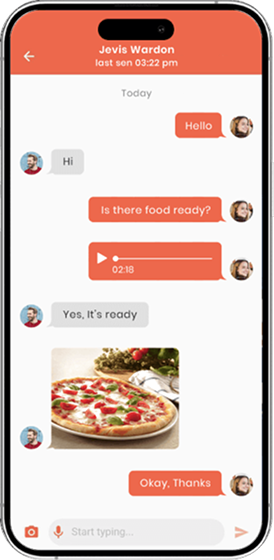
on_demand_worker_img4
<ul class="list"> <li class="item"> <h3>Chat with Customer</h3> Customer can message to assigned Driver within the app for hassle free delivery service.</li> <li class="item"> <h3>Send Image</h3> Customer can send image to assigned Driver within the app for hassle free delivery service.</l...
on_demand_provider_img1
<ul class="list"> <li class="item"> <h3>Booking History</h3> Keep track of your booking history with accessible records of your past completed service.</li> <li class="item"> <h3>Booking Status</h3> Provider can track the progress of their booked on-demand service.</li> <li class="item"...
on_demand_provider_img2
<ul class="list"> <li class="item"> <h3>Booking Details</h3> Your service reservation, including service type, date, time, and any specific requests you've provided.</li> <li class="item"> <h3>About Customer</h3> Providing comprehensive details about customer to enhance experience.</li> ...
on_demand_provider_img3
<ul class="list"> <li class="item"> <h3>Service List</h3> Get instant access and browse all your comprehensive service List.</li> <li class="item"> <h3>Service Details</h3> Add a service details to easy for customer’s seamless and reliable solutions.</li> <li class="item"> <h3>Delete...
on_demand_provider_img4
<ul class="list"> <li class="item"> <h3>All Workers List</h3> Discover a diverse array of skilled professionals available at your fingertips with the All Workers List.</li> <li class="item"> <h3>Worker Details</h3> Providing comprehensive details about worker like name, email, price etc.</...
on_demand_provider_img5
<ul class="list"> <li class="item"> <h3>Offers List</h3> Browse our Offers List for exclusive deals and discounts on a wide range of services!</li> <li class="item"> <h3>Discount Label</h3> Unlock exclusive savings offers on your favorite service with our Discount Label.</li> <li class=...
on_demand_provider_img6
<ul class="list"> <li class="item"> <h3>Total Balance</h3> app allows users to store funds within their account for convenient and swift transactions.</li> <li class="item"> <h3>Transaction History</h3> App provides users with a comprehensive overview of their past financial transactions.<...
on_demand_provider_img7
<ul class="list"> <li class="item"> <h3>Chat with Customer</h3> Service provider can message to customer within the app for hassle free service.</li> <li class="item"> <h3>Send Image</h3> Service provider can send image to assigned worker within the app for hassle free service.</li> ...

Your Trusted Hassle-Free Payment Gateways

Your Gateway to Endless Choices” is more than just a platform—it’s an invitation to explore boundless possibilities. Imagine a digital realm where every desire, interest, and curiosity finds its match. This gateway serves as a portal to a universe of options, where you can discover, create, and connect.

Exploring Technologies & Platforms

Exploring technologies and platforms can be an exciting journey, whether you’re a tech enthusiast, a developer, or someone interested in the latest innovations. Technology evolves rapidly, so it’s crucial to stay updated with the latest trends, news, and developments.

Your Integrated Multi-Vendor Marketplace

Experience the convenience of a one-stop-shop while enjoying the diversity and quality that comes with multiple vendors. Whether you’re a seller looking to expand your reach or a shopper in search of the perfect find, our Integrated Multi-Vendor Marketplace is here to connect you with endless possibilities.” With our intuitive interface, seamless transactions, and secure payment options, shopping has never been easier.
  • + In-App Communication
  • + Multiple Secure Payment Options
  • + Pre-build Layouts
  • + Real-time Chat
  • + Multilingual Support with RTL
  • + Dynamic Color Selection
  • + Live Order and Delivery Tracking
  • + Wallet System

Your Gateway to Endless Choices

Your Gateway to Endless Choices” is more than just a platform—it’s an invitation to explore boundless possibilities. Imagine a digital realm where every desire, interest, and curiosity finds its match. This gateway serves as a portal to a universe of options, where you can discover, create, and connect.

What our customers are saying

Not only is the quality of the code great. The Support around this product is amazing, some of the best support that I have gotten. They not only have quick responses but quick to solve the issues I have come across. the product itself has a wide array of detail that makes it very customizable to suit your needs. Im looking forward into discovering more amazing detail about this product. I definitely made the right choice!

Laustin1

United States

I purchased the extended license so I don’t know much about the code quality. But what I liked here was the Customer Support. The team got in touch with me soon after the purchase and started setting it up on my server. The system consists of Android and iOS apps (3 apps each) and a complete web-based admin panel. The team is helpful, cooperative and friendly and accommodates many of my requests. Some major requests, which I needed for my specific needs, were also possible at an additional cost because that require changes in coding, but the system is working well without those. I recommend purchasing extended license as it will cover the complete setup, which was not easy, at-least for me. Overall a very nice experience with the team and the system.

Burhan19851

Canada

The customer service is simply EXTRAORDINARY!… Without fear of being wrong, I think they are the elite of Envato, it is because of developers like them that one still has confidence in Envato.
Super Recommended!! The code is clean, the documentation is tremendously detailed!, and I repeat, Excellent! Customer Service!.

Grajalesvic

Colombia

My experience with siddhiinfosoft and their support team was simply fantastic. The software itself is intuitive and powerful, perfectly suited to my needs. But what truly impressed me was the unmatched customer service. Always friendly, patient, and knowledgeable, they were ready to answer my questions and resolve any issues. Their commitment to continuous improvement is admirable. In summary, I wholeheartedly recommend siddhiinfosoft and their team to anyone in search of a great software solution with excellent support.

Miked151

Netherlands

I recently had the pleasure of interacting with the incredible support team behind eMart, and I must say, I’m thoroughly impressed! From start to finish, their assistance was nothing short of exceptional. Their professionalism, expertise, and dedication to customer service make them an invaluable asset to the application and its users. Keep up the fantastic work!

Farzanas

India